解构 Solana 实时数据:基于 Substreams 的高性能 Indexer 构建实战
Table of Contents
解构 Solana 实时数据:基于 Substreams 的高性能 Indexer 构建实战
告别低效 RPC 轮询!本文深度解析 Solana 高性能索引技术 Substreams,直击如何将链上原始字节实时转化为结构化 SQL 数据。配合 Pinocchio 轻量化合约,彻底打通 Web3 全栈开发“上链”与“回流”的逻辑闭环,构建工业级数据驱动应用。
🎉 新年伊始,我也在不断精进。最近深度参与了 Solana 训练营第一阶段《区块链技术 101》,通过一个月的沉淀,我将 Pinocchio 合约开发与 Substreams 索引技术结合,整理成了这两篇深度笔记。希望在分享学习心得的同时,能给同样在 Solana 生态探索的 Builder 们提供一点实战参考。
在之前的文章《仅 0.6 秒编译!用 Pinocchio 打造极致轻量化 Solana Vault 合约全记录》中我们已经从创建一个简单的 Vault 存款与取款程序开始,利用 Shank 和 Codama 构建一套自动化的客户端 SDK,并最终完成从 Rust 到 TypeScript 的全链路自动化测试。在完成合约开发与 SDK 集成后,我们解决了‘如何与链上交互’的问题。然而,在真实的 Web3 应用场景中,另一个挑战接踵而至:如何实时、高效地获取并检索这些链上数据?
传统的 RPC 轮询(Polling)在面对高频交易和大规模历史数据回溯时,往往显得捉襟见肘。本文我们将引入 StreamingFast Substreams,展示如何构建一个工业级的实时索引器(Indexer),将 Pinocchio Vault 的链上原始字节,精准转化为本地 PostgreSQL 数据库中的结构化数据。
在深入代码之前,我们先聊聊为什么要放弃传统的 RPC 方案:
- 告别轮询地狱:不再需要写死循环去请求
getProgramAccounts,避免被 RPC 节点限流。 - 秒级历史回溯:Substreams 的并行架构让我们可以用几分钟时间同步完过去几个月甚至几年的交易数据。
- 原生分叉处理:通过内置的 Cursor 机制,优雅地处理 Solana 常见的链重组(Reorg),确保数据库数据永远准确。
为了更直观地理解这套架构,我们可以将 Solana 应用的开发拆解为两条互补的路径,它们共同构成了 Web3 应用的数据闭环:
-
第一条路径 (IDL -> SDK):链上交互层 (On-chain Interaction Layer)
利用 Codama/Shank 从 IDL 自动生成 Client SDK,是为了让前端/后端能方便地“往链上写数据”(发送交易)。这也就是我们在之前的文章中通过 Shank/Codama 实现的 IDL $\rightarrow$ SDK 流程。它的核心任务是解决**‘往链上写数据’**的问题。通过自动生成的 Client SDK,前端或后端可以方便地构造指令、签署交易,将业务意图准确地推送到 Solana 链上。
-
第二条路径 (Substreams -> Postgres):高性能索引与数据层 (High-performance Indexing & Data Layer)
利用 Substreams 实时解析数据并存储到数据库,是为了让应用能高效地“从链下读数据”(复杂查询)。
这就是本文的主角:Substreams $\rightarrow$ Postgres。它的核心任务是解决**‘从链下读数据’**的问题。利用 Substreams 的并行解析能力,我们将链上那些杂乱无章的原始字节实时抽离、清洗,并结构化地存储到本地数据库中。
深度对比:两者的关系
| 特性 | 第一条路径 (SDK) | 第二条路径 (Substreams) |
|---|---|---|
| 主要工具 | Shank, Codama | Substreams, Rust, Postgres |
| 数据流向 | 链下 -> 链上 (Input) | 链上 -> 链下 (Output) |
| 解决的问题 | 怎么更简单地发起交易? | 交易发生后,怎么快速查到结果? |
| 你的角色 | 协议集成工程师 | 数据架构师 / 后端工程师 |
如何从 Rust 合约代码生成供前端/后端使用的 Client SDK
graph TD
    A[Solana Rust Contract Code] --> B{Shank / Codama IDL Tooling};
    B --> C[生成 IDL Interface Definition Language];
    C --> D[生成 Client SDK];
    D --> E[前端 / 后端应用];
    E --> F[发送交易 Invoke Contract];
    F --> G[Solana 区块链];

    subgraph "Contract Development & Integration"
        A
        B
        C
        D
        E
        F
    end

    style A fill:#D4EDDA,stroke:#28A745,stroke-width:2px
    style C fill:#FFEBA2,stroke:#FFC107,stroke-width:2px
    style D fill:#BDE0FE,stroke:#007BFF,stroke-width:2px
    style E fill:#D1C4E9,stroke:#673AB7,stroke-width:2px
    style G fill:#E1F5FE,stroke:#2196F3,stroke-width:2px
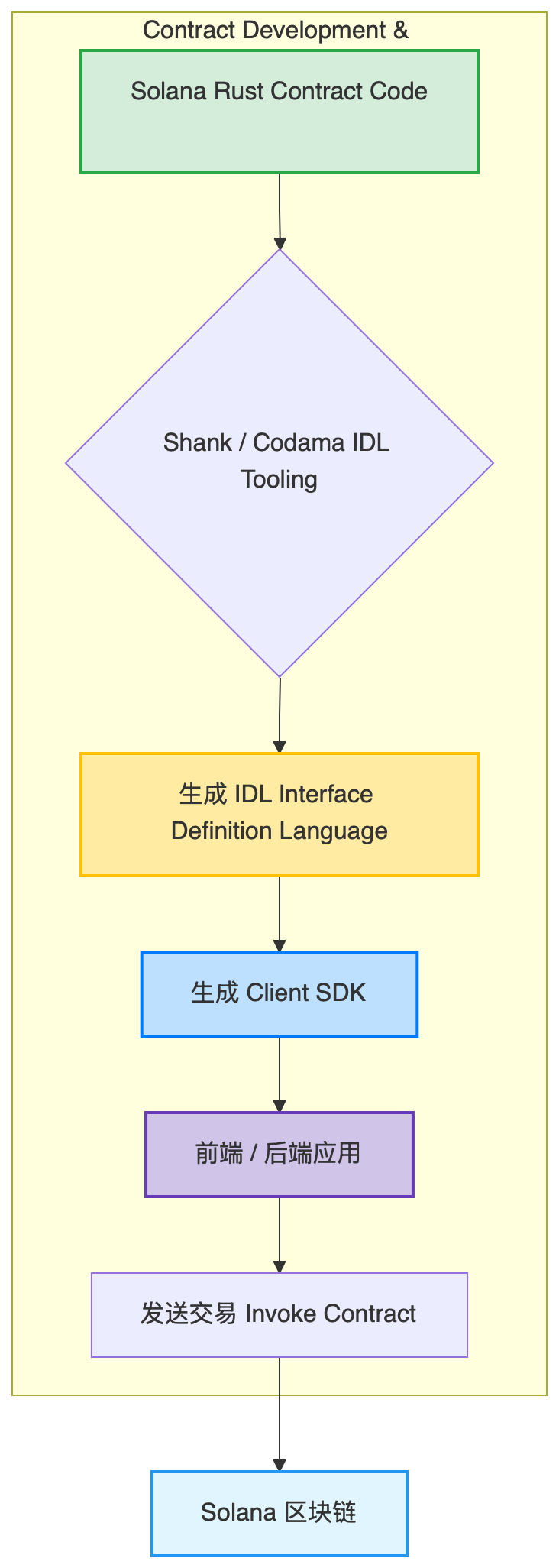
💡 流程详解
- 开发者侧 (Development):
- 你编写 Rust 程序 (Contract)。
- 使用 Shank/Codama 自动生成 Client SDK。
- 交互侧 (Interaction):
- 用户通过 SDK 发送交易。
- 交易进入 Solana 链 (On-chain)。
- 提取侧 (Extraction):
- Substreams 引擎实时监听 Solana 区块。
- 你的 Rust 逻辑在 WASM 沙盒中过滤出特定的指令(如 Deposit)。
- 持久化侧 (Persistence):
- Sink 工具将解析后的结构化数据存入 PostgreSQL。
- Pgweb 提供可视化查看,数据随时待命。
如何从 Solana 链上高效地读取和解析数据到本地数据库
graph TD
    A[Solana 区块链] --> B(StreamingFast Substreams 引擎);
    B --> C[你的 Rust Map Module WASM];
    C -- "解析特定指令 (如 Deposit)" --> D[结构化 Protobuf 数据 DatabaseChanges];
    D --> E(Substreams Sink Tool);
    E -- "实时写入" --> F[PostgreSQL 数据库];
    F --> G[Pgweb / 你的后端应用];

    subgraph "High-Performance Data Indexing"
        A
        B
        C
        D
        E
        F
        G
    end

    style A fill:#E1F5FE,stroke:#2196F3,stroke-width:2px
    style B fill:#F5E0FF,stroke:#9333EA,stroke-width:2px
    style C fill:#FFFDE7,stroke:#FFECB3,stroke-width:2px
    style D fill:#CFD8DC,stroke:#607D8B,stroke-width:2px
    style E fill:#DCEDC8,stroke:#8BC34A,stroke-width:2px
    style F fill:#FBE9E7,stroke:#FF5722,stroke-width:2px
    style G fill:#E3F2FD,stroke:#90CAF9,stroke-width:2px
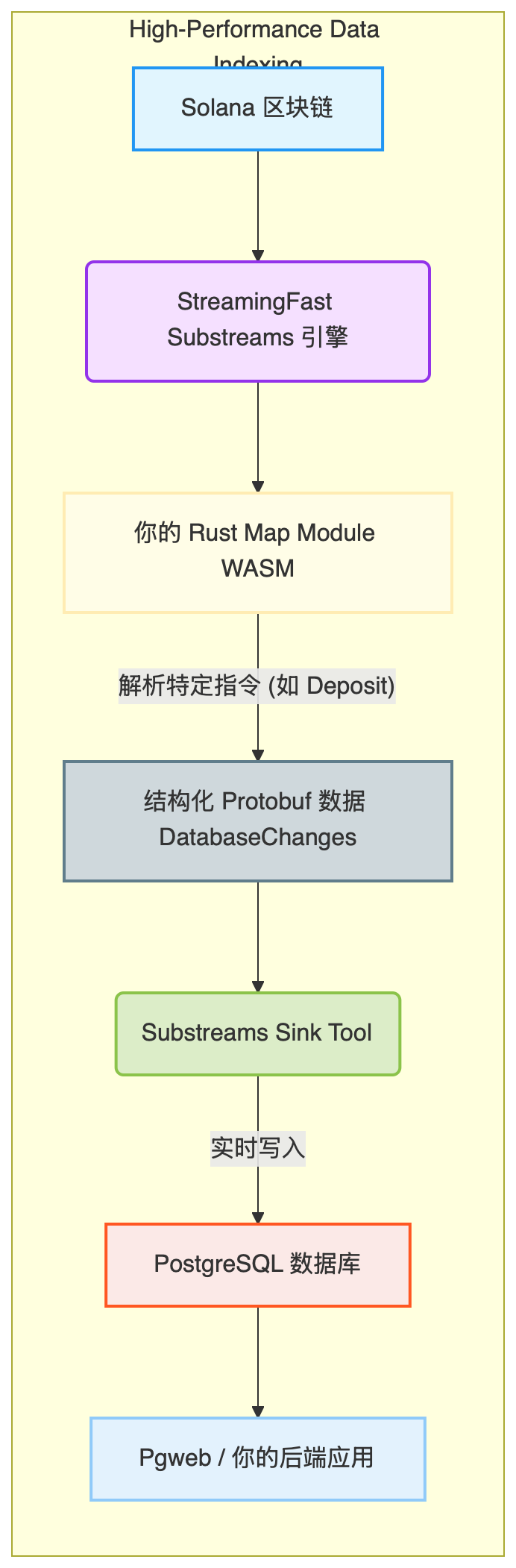
至此,我们已经理清了整套系统的‘神经脉络’。接下来,我们将正式进入实操环节,看看如何通过 Rust 编写这颗连接链上与本地数据库的‘心脏’——Substreams Map Module。
graph TD
    subgraph "Solana Full-Stack Application Data Flow"
        direction LR

        subgraph "Chain Interaction (Write)"
            A[Solana Rust Contract Code] --> B{Shank / Codama IDL Tooling};
            B --> C[生成 IDL];
            C --> D[生成 Client SDK];
            D --> E[前端 / 后端应用];
            E --> F[发送交易 Invoke Contract];
        end

        F --> G[Solana 区块链];

        subgraph "Data Indexing (Read)"
            H(StreamingFast Substreams 引擎) --> I[你的 Rust Map Module WASM];
            I --> J[结构化 Protobuf 数据 DatabaseChanges];
            J --> K(Substreams Sink Tool);
            K --> L[PostgreSQL 数据库];
            L --> M[Pgweb / 你的后端应用];
        end

        G --> H;

        style A fill:#D4EDDA,stroke:#28A745,stroke-width:2px
        style C fill:#FFEBA2,stroke:#FFC107,stroke-width:2px
        style D fill:#BDE0FE,stroke:#007BFF,stroke-width:2px
        style E fill:#D1C4E9,stroke:#673AB7,stroke-width:2px
        style F fill:#ADD8E6,stroke:#87CEEB,stroke-width:2px
        style G fill:#E1F5FE,stroke:#2196F3,stroke-width:2px
        style H fill:#F5E0FF,stroke:#9333EA,stroke-width:2px
        style I fill:#FFFDE7,stroke:#FFECB3,stroke-width:2px
        style J fill:#CFD8DC,stroke:#607D8B,stroke-width:2px
        style K fill:#DCEDC8,stroke:#8BC34A,stroke-width:2px
        style L fill:#FBE9E7,stroke:#FF5722,stroke-width:2px
        style M fill:#E3F2FD,stroke:#90CAF9,stroke-width:2px
    end

实操
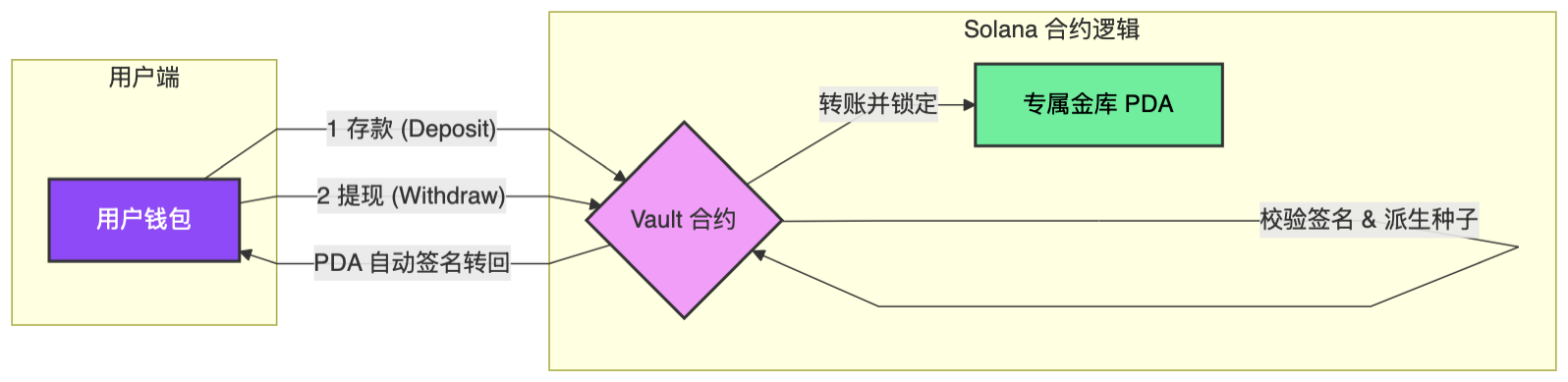
在开始编写索引器代码之前,我们首先要明确 Pinocchio Vault 合约在链上的运行逻辑。Substreams 的本质是‘监听并解析’,如果我们不知道合约是如何处理资金的,就无法准确地提取数据。
下图展示了合约内部的三大核心指令流:初始化 (Initialize)、存款 (Deposit) 与 取款 (Withdraw)。
graph TD
    Start((开始)) --> Choice{指令类型}

    %% 初始化逻辑
    Choice -- "InitializeVault" --> Init[创建 Vault 账户]
    Init --> SetAdmin[设置管理员与配置]
    SetAdmin --> End((完成))

    %% 存款逻辑
    Choice -- "Deposit" --> CheckVault[校验 Vault 状态]
    CheckVault --> TransferSOL[从 Owner 转账 SOL 到 Vault PDA]
    TransferSOL --> MintShares[计算并记录存款数据]
    MintShares --> End

    %% 取款逻辑
    Choice -- "Withdraw" --> Auth[校验 Owner 签名与份额]
    Auth --> BurnShares[扣除/销毁份额记录]
    BurnShares --> TransferBack[从 Vault PDA 转回 SOL 给 Owner]
    TransferBack --> End

    subgraph "On-Chain Program (Rust)"
        Choice
        Init
        SetAdmin
        CheckVault
        TransferSOL
        MintShares
        Auth
        BurnShares
        TransferBack
    end

    style Start fill:#f9f,stroke:#333,stroke-width:2px
    style End fill:#f9f,stroke:#333,stroke-width:2px
    style Choice fill:#fff4dd,stroke:#d4a017,stroke-width:2px
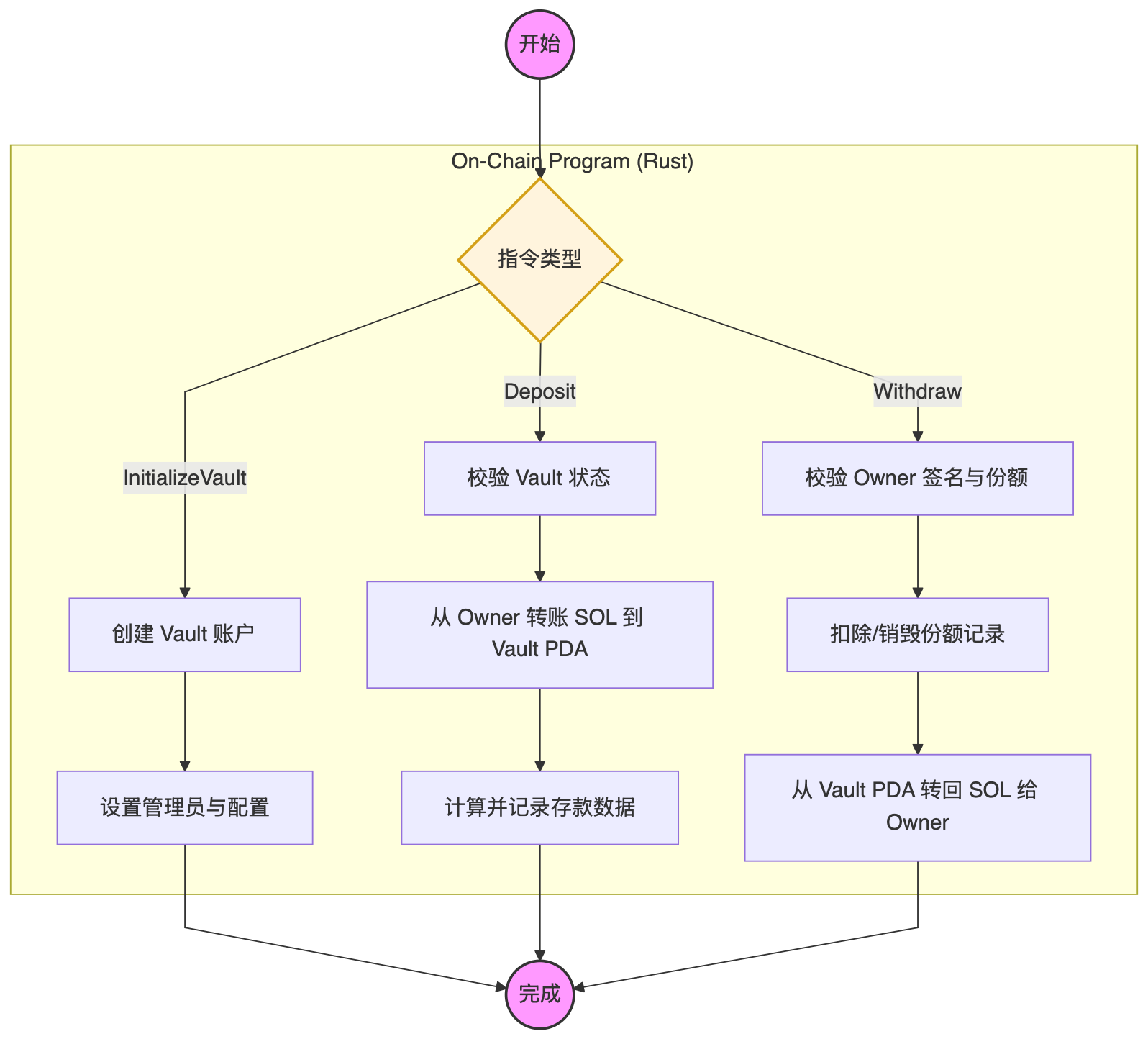
从图中我们可以看到几个关键的解析切入点,这将直接决定我们后续 Rust 代码的编写逻辑:
- 指令分发 (Instruction Discriminator): 每一个指令流的起点都是
Choice(在代码中表现为第一个字节的 Discriminator)。我们的索引器必须首先精准识别出这是Deposit还是Withdraw。 - 账户状态校验: 在
Deposit过程中,资金从Owner流向Vault PDA。这意味着我们在解析时,不仅要抓取交易金额,还要准确提取出这两个账户的地址。 - 数据沉淀:
MintShares和BurnShares步骤产生的业务数据,就是我们最终要同步到本地 PostgreSQL 数据库中的核心指标。
具体来说:
- MintShares 对应的是
deposits表中的amount增加,记录了用户对金库的贡献度。 - BurnShares 对应的是
withdraws表中的记录,记录了资金从金库退还给用户的历史。
我们的 Substreams 索引器,本质上就是在捕捉这些‘铸造’与‘销毁’瞬间产生的 事件数据(Event Data)。
查看项目目录结构
blueshift_vault on main [!?] is 📦 0.1.0 via 🦀 1.92.0
➜ tree . -L 6 -I ".gitignore|.github|.git|target|clients"
.
├── Cargo.lock
├── Cargo.toml
├── LICENSE
├── Makefile
├── README.md
├── _typos.toml
├── cliff.toml
├── deny.toml
├── deploy_out
│ └── blueshift_vault.so
├── docs
│ └── image.png
├── idl
│ └── blueshift_vault.json
├── pinocchio-vault-substreams
├── scripts
│ └── codama_init.json
└── src
├── instructions
│ ├── deposit.rs
│ ├── mod.rs
│ └── withdraw.rs
└── lib.rs
8 directories, 16 files
本地部署
blueshift_vault on main [!?] is 📦 0.1.0 via 🦀 1.92.0 took 6.2s
➜ make deploy CLUSTER=localnet
🦀 Building Rust program for Solana...
Finished `release` profile [optimized] target(s) in 0.09s
✅ Build complete: target/deploy/blueshift_vault.so
🚀 Deploying to localnet...
Program Id: A11gcDm7e8Pit4RiunfhtrK1BKU4oYAa3nx54R4YnFgS
Signature: 32YRiHnSxsuyHruUucXF9STgbpZ44F43G5eGvxu75vSRRT1wmFieQPu2pcarXAfivG4iF7eEpqByoo6YyRXBTwEH
测试
在索引器正式上岗之前,我们需要先往链上‘投喂’一些真实的数据。
利用前文中通过 Codama 自动生成的 TypeScript SDK,我们编写了一个简单的测试脚本。通过 bun run,我们模拟了用户从初始化金库到存款(Deposit)、**取款(Withdraw)**的完整业务路径。
验证闭环:端到端(E2E)指令交互测试
blueshift_vault/clients on main [!?] is 📦 1.0.0 via 🍞 v1.2.17 via 🦀 1.92.0
⇣7% ➜ bun run test_vault.ts
🚀 Starting Blueshift Vault Test...
🔑 Payer loaded: 6MZDRo5v8K2NfdohdD76QNpSgk3GH3Aup53BeMaRAEpd
🔍 Deriving Vault PDA...
📍 Vault PDA Address: GbLNULHLykpyzFTBf5mYsAksoxqvD6UB6sofZjj1LQah
📦 Creating Deposit Instruction...
⏳ Sending Deposit...
✅ Deposit OK!
🔗 Transaction: https://explorer.solana.com/tx/2dG8FwRnKxQk3a9ps4ovs9RNU64iT3jxKDQLNunsazNn3ZexajLwRRmsJm5XyWk6jHGYR6HBYhbMHM5DmaiMnzq4?cluster=custom&customUrl=http://127.0.0.1:8899
⏳ Sending Withdraw...
✅ Withdraw OK!
🔗 Transaction: https://explorer.solana.com/tx/4ko6iRSVsQEqB5Ht2vzsWxvs9dNJ472j1R5zJZWASJcbCxC8ud7PCbf43M1RDA2TdouYbo7vh8ePXEcYfnZwJLTw?cluster=custom&customUrl=http://127.0.0.1:8899
为了验证 Pinocchio SDK 的跨语言兼容性,我不满足于仅仅通过 TypeScript 进行交互。由于我们使用了 Codama 自动生成代码,我几乎在同一时间也生成了一套 Rust 版本的 Client SDK。
紧接着 TypeScript 的测试成功,我切换到了 clients/src/generated/rust 目录下。仅仅运行了 cargo run,这套由 IDL 自动衍生出来的 Rust 客户端便完成了同样的动作:派生 PDA、构造指令、对交易进行签名并推送到本地集群。
blueshift_vault/clients/src/generated/rust on main [!?] is 📦 1.0.0 via 🍞 v1.2.17 via 🦀 1.92.0 took 2.4s
⇡5% ➜ cargo run
Finished `dev` profile [unoptimized + debuginfo] target(s) in 0.55s
Running `target/debug/blueshift_test`
🔑 Payer: 6MZDRo5v8K2NfdohdD76QNpSgk3GH3Aup53BeMaRAEpd
📍 Vault PDA: GbLNULHLykpyzFTBf5mYsAksoxqvD6UB6sofZjj1LQah
📦 构建 Deposit 指令...
✅ Deposit 成功! 签名: LrAUvq6SMtu23f8VHpNHbbFmtSZw6Li2oRdJcxbHvbnkXFSiouuz2kSXe1ykWntkMBfA2hkbFySBX7Y6bARB6p1
💸 构建 Withdraw 指令...
✅ Withdraw 成功! 签名: rJURceeH64QMAx2Lajwbv3Gu9nPpJTuE8qF6cmX1XuDKktzLKzcfreeYgnGVXDDqX9358dmmFDfwHBV1CzBX8e2
终端的绿勾再次亮起,这意味着:
- 协议一致性:无论使用哪种语言,我们的合约接口定义(IDL)都是坚固且准确的。
- 数据多样性:此时,本地 Solana 链上已经积累了来自不同客户端、不同语言环境的多次真实交易数据,这为接下来的 Substreams 高性能索引测试 准备了最完美的‘演练场’。
万事俱备,只欠索引。 链上已经有钱了,交易已经发生了。现在,让我们把视线转向文章的主角:看看 Substreams 是如何化身‘显微镜’,从这些复杂的交易字节中,把我们的存款记录一条条‘洗’出来的。
一键开启:使用 substreams init 自动化构建 Indexer 脚手架
blueshift_vault/pinocchio-vault-substreams on main [!?] is 📦 0.1.0 via 🦀 1.92.0 took 8m 30.3s
➜ substreams init
File "./generator.json" renamed to "./generator.2026-02-06T01-13-41.json"
Getting available code generators from https://codegen.substreams.dev...
┃ Chosen protocol: Solana - Solana
┃ Chosen generator: sol-transactions - Get Solana transactions filtered by one or several Program IDs
Ok, let's start a new package.
┃ Please enter the project name: pinocchio_vault_indexer
┃ Please select the chain: Solana Devnet
Got it, will be using chain "Solana Devnet"
┃ At what block do you want to start indexing data?: 440092945
┃ Query to filter the transaction by Program IDs and/or accounts
Supported fields:
- program:<PROGRAM_ID> to filter by Program IDs
- account:<ACCOUNT_ADDRESS> to filter by accounts involved in the transaction's instructions
Supported operators are '||' and '&&' for logical operations and '()' for grouping.
Examples
# Find any transaction containing instructions from the Compute Budget program
'program:ComputeBudget111111111111111111111111111111
# Find any transaction from the Token program involving a specific account
program:TokenkegQfeZyiNwAJbNbGKPFXCWuBvf9Ss623VQ5DA && account:3MQw72oGrizUDEcD9gZYMgqo1pc364y5GnnJHcGpvurK: program:A11gcDm7e8Pit4RiunfhtrK1BKU4oYAa3nx54R4YnFgS
┃ How would you like to consume the Substreams?: To Postgres
Generating Substreams module source code...
┃ In which directory do you want to download the project?
┃ > /Users/qiaopengjun/Code/Solana/blueshift_vault/pinocchio-vault-substreams/pinocchio_vault_indexer
Project will be saved in /Users/qiaopengjun/Code/Solana/blueshift_vault/pinocchio-vault-substreams/pinocchio_vault_indexer
Creating directory: /Users/qiaopengjun/Code/Solana/blueshift_vault/pinocchio-vault-substreams/pinocchio_vault_indexer
Writing local files:
- .gitignore
- Cargo.toml
- README.md
- buf.gen.yaml
- proto/mydata.proto
Modify this file to reflect your needs. It contains protobuf models.
- src/lib.rs
Modify this file to reflect your needs. This is the main entrypoint.
- substreams.yaml
Substreams manifest, a configuration file which defines the different modules
- docker-compose.yaml
Docker Compose file to start the selected sink
Your Substreams project is ready! Start streaming with:
cd /Users/qiaopengjun/Code/Solana/blueshift_vault/pinocchio-vault-substreams/pinocchio_vault_indexer
substreams auth # Authenticates your CLI with your thegraph.market account
substreams build # Build your Substreams module
substreams gui # Get streaming!
Sink to Postgres:
1. Get the binary from https://github.com/streamingfast/substreams-sink-sql
2. Start Postgres via Docker docker compose up -d
3. Run substreams-sink-sql from-proto psql://dev:insecure@localhost:5432/main substreams.yaml pinocchio_vault_indexer
4. See https://docs.substreams.dev/how-to-guides/sinks/sql/relational-mappings for more details.
Optionally, publish your Substreams to the Substreams Registry (https://substreams.dev) with:
substreams registry login # Login to substreams.dev
substreams registry publish # Publish your Substreams to substreams.dev
如果说编写 Rust 合约是打造核心引擎,那么 substreams init 就是在为你自动组装一套高性能的数据流水线。通过这个交互式命令,我们不仅选定了针对 Solana 交易的专属生成器(sol-transactions),还精准设定了索引的起始区块与过滤规则(Program ID)。它最强大的地方在于能够‘按需定制’:只需一次交互,它便自动生成了包含 Protobuf 定义、Rust 逻辑入口、Substreams 描述文件(yaml)以及用于本地数据落地的 Docker Compose 配置。这套标准化的脚手架,让我们能够跳过枯燥的基础配置,直接进入业务解析逻辑的核心开发。
核心编译:将 Rust 逻辑注入 WASM “数据芯片”
substreams build 并非简单的代码编译,它是将我们编写的 Rust 业务逻辑通过 cargo build 编译成 WebAssembly (WASM) 格式二进制文件的过程。
在 Substreams 的架构中,索引逻辑并不直接运行在你的操作系统上,而是运行在 StreamingFast 节点的隔离沙盒(WASM Runtime)里。这意味着你的代码具有极高的安全性、跨平台一致性和近乎原生的执行性能。执行该命令后,系统会检查你的 substreams.yaml 配置文件,确保所有的模块定义、输入输出流以及 Protobuf 协议都能完美对齐。只有编译成功,你才能获得那颗能够‘嵌入’区块链数据流中的‘智能芯片’(通常以 .spkg 文件的形式打包)。
blueshift_vault/pinocchio-vault-substreams/pinocchio_vault_indexer on main [!?] via 🦀 1.92.0
➜ substreams build
🏗️ Building Substreams package from /Users/qiaopengjun/Code/Solana/blueshift_vault/pinocchio-vault-substreams/pinocchio_vault_indexer/substreams.yaml
📋 Using existing buf.gen.yaml configuration
📦 Generating protobuf code (buf generate <pinocchio_vault_indexer.tmp.spkg#format=bin> --exclude-path sf/substreams/rpc --exclude-path sf/substreams/v1 --exclude-path sf/substreams/sink --exclude-path sf/substreams/index --exclude-path sf/substreams/index/v1 --exclude-path instructions.proto --exclude-path transactions.proto --exclude-path google --include-imports)
🎯 Protobuf generation complete
🦀 Rust binary detected
✅ Rust/Cargo found
Updating crates.io index
Blocking waiting for file lock on package cache
Locking 86 packages to latest compatible versions
Adding generic-array v0.14.7 (available: v0.14.9)
Adding prost v0.13.5 (available: v0.14.3)
Adding prost-types v0.13.5 (available: v0.14.3)
Blocking waiting for file lock on package cache
Blocking waiting for file lock on package cache
Downloaded substreams-solana v0.14.3
Downloaded hex-literal v0.3.4
Downloaded pad v0.1.6
Downloaded substreams-solana-macro v0.14.3
Downloaded multimap v0.10.1
Downloaded substreams-macro v0.7.6
Downloaded substreams-macro v0.6.4
Downloaded bigdecimal v0.3.1
Downloaded substreams-solana-core v0.14.3
Downloaded prost-build v0.13.5
Downloaded ucd-trie v0.1.7
Downloaded substreams v0.6.4
Downloaded prost-types v0.13.5
Downloaded pest_derive v2.8.6
Downloaded substreams v0.7.6
Downloaded pest_generator v2.8.6
Downloaded prettyplease v0.2.37
Downloaded bytes v1.11.1
Downloaded pest_meta v2.8.6
Downloaded bigdecimal v0.4.10
Downloaded pest v2.8.6
Downloaded regex v1.12.3
Downloaded libm v0.2.16
Downloaded unicode-width v0.1.14
Downloaded regex-syntax v0.8.9
Downloaded regex-automata v0.4.14
Downloaded petgraph v0.7.1
Downloaded 27 crates (3.1MiB) in 1.12s
Blocking waiting for file lock on package cache
Compiling proc-macro2 v1.0.106
Compiling quote v1.0.44
Compiling unicode-ident v1.0.22
Compiling autocfg v1.5.0
Compiling anyhow v1.0.100
Compiling thiserror v1.0.69
Compiling either v1.15.0
Compiling syn v1.0.109
Compiling ucd-trie v0.1.7
Compiling memchr v2.7.6
Compiling bytes v1.11.1
Compiling equivalent v1.0.2
Compiling winnow v0.7.14
Compiling itertools v0.14.0
Compiling hashbrown v0.16.1
Compiling toml_datetime v0.7.5+spec-1.1.0
Compiling num-traits v0.2.19
Compiling pest v2.8.6
Compiling unicode-width v0.1.14
Compiling indexmap v2.13.0
Compiling rustversion v1.0.22
Compiling libm v0.2.16
Compiling toml_parser v1.0.6+spec-1.1.0
Compiling pest_meta v2.8.6
Compiling pad v0.1.6
Compiling toml_edit v0.23.10+spec-1.0.0
Compiling proc-macro-crate v3.4.0
Compiling bigdecimal v0.4.10
Compiling hex v0.4.3
Compiling hex-literal v0.3.4
Compiling bs58 v0.4.0
Compiling substreams-solana-macro v0.14.3
Compiling num-integer v0.1.46
Compiling num-bigint v0.4.6
Compiling bigdecimal v0.3.1
Compiling syn v2.0.114
Compiling pest_generator v2.8.6
Compiling thiserror-impl v1.0.69
Compiling prost-derive v0.13.5
Compiling num_enum_derive v0.7.5
Compiling pest_derive v2.8.6
Compiling num_enum v0.7.5
Compiling prost v0.13.5
Compiling substreams-macro v0.6.4
Compiling substreams-macro v0.7.6
Compiling prost-types v0.13.5
Compiling substreams-solana-core v0.14.3
Compiling substreams v0.6.4
Compiling substreams v0.7.6
Compiling substreams-solana v0.14.3
Compiling pinocchio_vault_indexer v0.0.1 (/Users/qiaopengjun/Code/Solana/blueshift_vault/pinocchio-vault-substreams/pinocchio_vault_indexer)
Finished `release` profile [optimized] target(s) in 22.04s
🔧 Binary compilation complete
📦 Package created successfully at pinocchio-vault-indexer-v0.1.0.spkg
✅ Build complete!
巨大的成功!编译通过(✅ Build complete!)意味着你的开发环境、Rust 链以及所有的依赖(包括 substreams-solana)都已经配置正确了。
你现在拥有了一个可以直接运行的 .spkg 文件。但注意,现在的代码是 substreams init 生成的默认模板(它可能只是简单地抓取所有交易,而没有解析你 Pinocchio 合约的具体逻辑)。
协议对齐:substreams protogen 实现 Schema-to-Code 的强类型映射
blueshift_vault/pinocchio-vault-substreams/pinocchio_vault_indexer on main [!?] is 📦 0.0.1 via 🦀 1.92.0
➜ substreams protogen
🔧 Generating protobuf bindings from substreams.yaml
📋 Using existing buf.gen.yaml configuration
📦 Generating protobuf code (buf generate <pinocchio_vault_indexer.tmp.spkg#format=bin> --exclude-path sf/substreams/rpc --exclude-path sf/substreams/v1 --exclude-path sf/substreams/sink --exclude-path sf/substreams/index --exclude-path sf/substreams/index/v1 --exclude-path instructions.proto --exclude-path transactions.proto --exclude-path google --include-imports)
🎯 Protobuf generation complete
✅ Protobuf bindings generated successfully
如果说 Protobuf 文件(.proto)是我们为数据开出的‘规格清单’,那么 substreams protogen 就是将这份清单翻译成 Rust 语言的‘全自动翻译官’。
在分布式系统中,最头疼的就是数据格式不一致。这个命令的作用是读取项目中的 proto 定义,并结合 substreams.yaml 配置文件,自动生成对应的 Rust 结构体(通常位于 src/pb 目录下)。这意味着,当我们在 Rust 代码中引用 DepositEvent 或 VaultUpdate 时,我们享有编译器提供的类型检查、自动补全和内存安全保证。你不再需要手动编写繁琐的结构体定义,也不用担心字段名拼错。只要 .proto 文件变了,运行一次 protogen,整个项目的代码基础就会自动同步,确保了‘所写即所得’。
查看目录结构
blueshift_vault/pinocchio-vault-substreams on main [!?] is 📦 0.1.0 via 🦀 1.92.0
➜ ls
generator.2026-02-06T01-13-41.json pinocchio_vault_indexer
generator.json
blueshift_vault/pinocchio-vault-substreams on main [!?] is 📦 0.1.0 via 🦀 1.93.1 on 🐳 v28.5.2 (orbstack)
➜ tree . -L 6 -I ".gitignore|.github|.git|target|node_modules|data"
.
├── generator.2026-02-06T01-13-41.json
├── generator.json
└── pinocchio_vault_indexer
├── Cargo.lock
├── Cargo.toml
├── README.md
├── buf.gen.yaml
├── docker-compose.yaml
├── pinocchio-vault-indexer-v0.1.0.spkg
├── proto
│ ├── database_changes.proto
│ └── mydata.proto
├── replay.log
├── schema.sql
├── src
│ ├── lib copy.rs
│ ├── lib.rs
│ └── pb
│ ├── mod.rs
│ ├── pinocchio_vault.v1.rs
│ ├── sf.solana.type.v1.rs
│ ├── sf.substreams.rs
│ ├── sf.substreams.sink.database.v1.rs
│ └── sf.substreams.solana.v1.rs
└── substreams.yaml
5 directories, 21 files
再次编译
blueshift_vault/pinocchio-vault-substreams/pinocchio_vault_indexer on main [!?] is 📦 0.0.1 via 🦀 1.92.0 took 3.9s
➜ substreams build
🏗️ Building Substreams package from /Users/qiaopengjun/Code/Solana/blueshift_vault/pinocchio-vault-substreams/pinocchio_vault_indexer/substreams.yaml
⚡ Protobuf generation skipped (no changes detected)
🦀 Rust binary detected
✅ Rust/Cargo found
Compiling pinocchio_vault_indexer v0.0.1 (/Users/qiaopengjun/Code/Solana/blueshift_vault/pinocchio-vault-substreams/pinocchio_vault_indexer)
warning: struct `Block` is never constructed
--> src/pb/sf.solana.type.v1.rs:7:12
|
7 | pub struct Block {
| ^^^^^
|
= note: `#[warn(dead_code)]` (part of `#[warn(unused)]`) on by default
warning: struct `Rewards` is never constructed
--> src/pb/sf.solana.type.v1.rs:206:12
|
206 | pub struct Rewards {
| ^^^^^^^
warning: struct `UnixTimestamp` is never constructed
--> src/pb/sf.solana.type.v1.rs:212:12
|
212 | pub struct UnixTimestamp {
| ^^^^^^^^^^^^^
warning: struct `BlockHeight` is never constructed
--> src/pb/sf.solana.type.v1.rs:218:12
|
218 | pub struct BlockHeight {
| ^^^^^^^^^^^
warning: struct `FieldOptions` is never constructed
--> src/pb/sf.substreams.rs:5:12
|
5 | pub struct FieldOptions {
| ^^^^^^^^^^^^
warning: `pinocchio_vault_indexer` (lib) generated 5 warnings
Finished `release` profile [optimized] target(s) in 1.51s
🔧 Binary compilation complete
📦 Package created successfully at pinocchio-vault-indexer-v0.1.0.spkg
✅ Build complete!
恭喜!看到 ✅ Build complete!,这意味着你的 Substreams 索引器已经彻底解决了所有类型冲突、路径错误和逻辑适配问题。
那些 warning 可以完全忽略,它们只是 Rust 编译器提醒你有一些生成的 Protobuf 结构体(比如 Block 或 Rewards)在当前的业务逻辑中没被用到,这对运行没有任何影响。
接下来,我们只需要执行 substreams gui,就能亲眼看到链上的原始数据是如何被这段 WASM 代码实时解构成我们想要的结构化信息的。
substreams gui substreams.yaml map_program_data -e devnet.sol.streamingfast.io:443
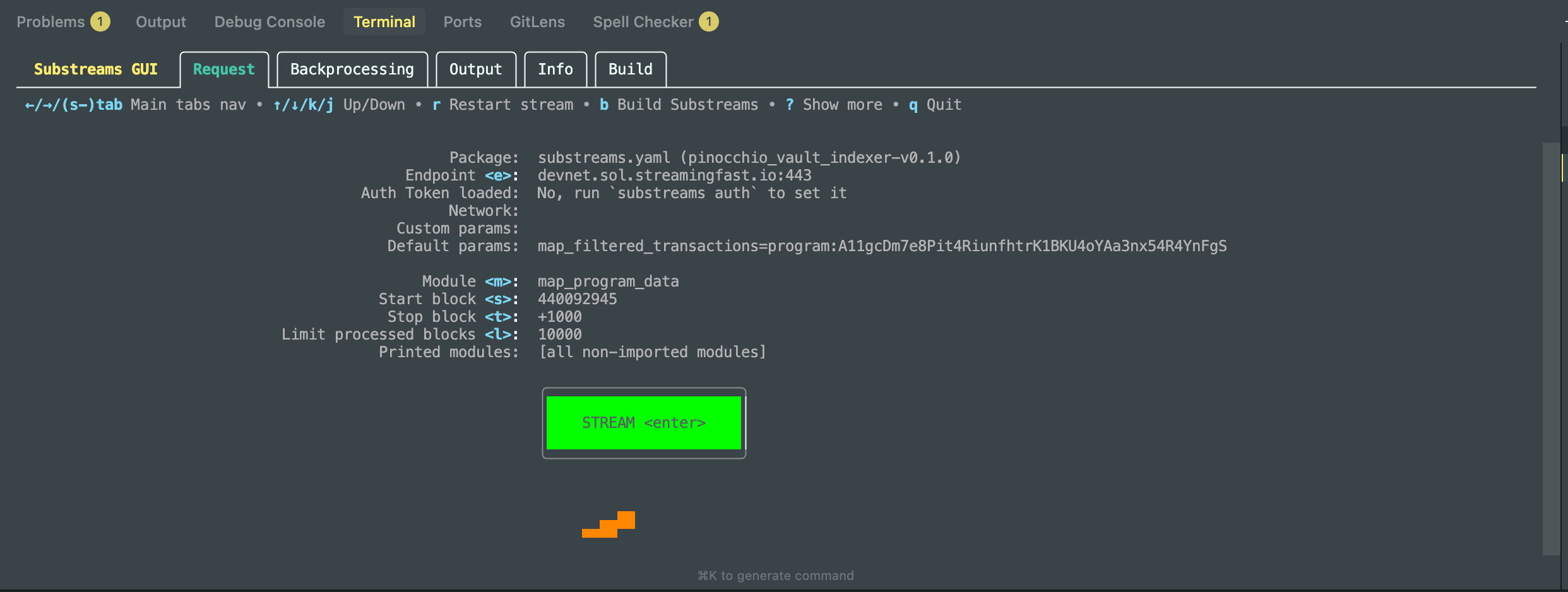
Substreams 已经准备就绪,所有的模块依赖、参数配置和 WASM 编译都已经通过了。
🔍 你的 GUI 界面透露的关键信息
- Package: 加载的是你的
pinocchio_vault_indexer-v0.1.0。 - Endpoint: 正确指向了
devnet.sol.streamingfast.io:443。 - Module: 目标模块是
map_program_data。 - Params:
map_filtered_transactions已经正确带上了你的程序 IDA11gcDm...。
回车后报错
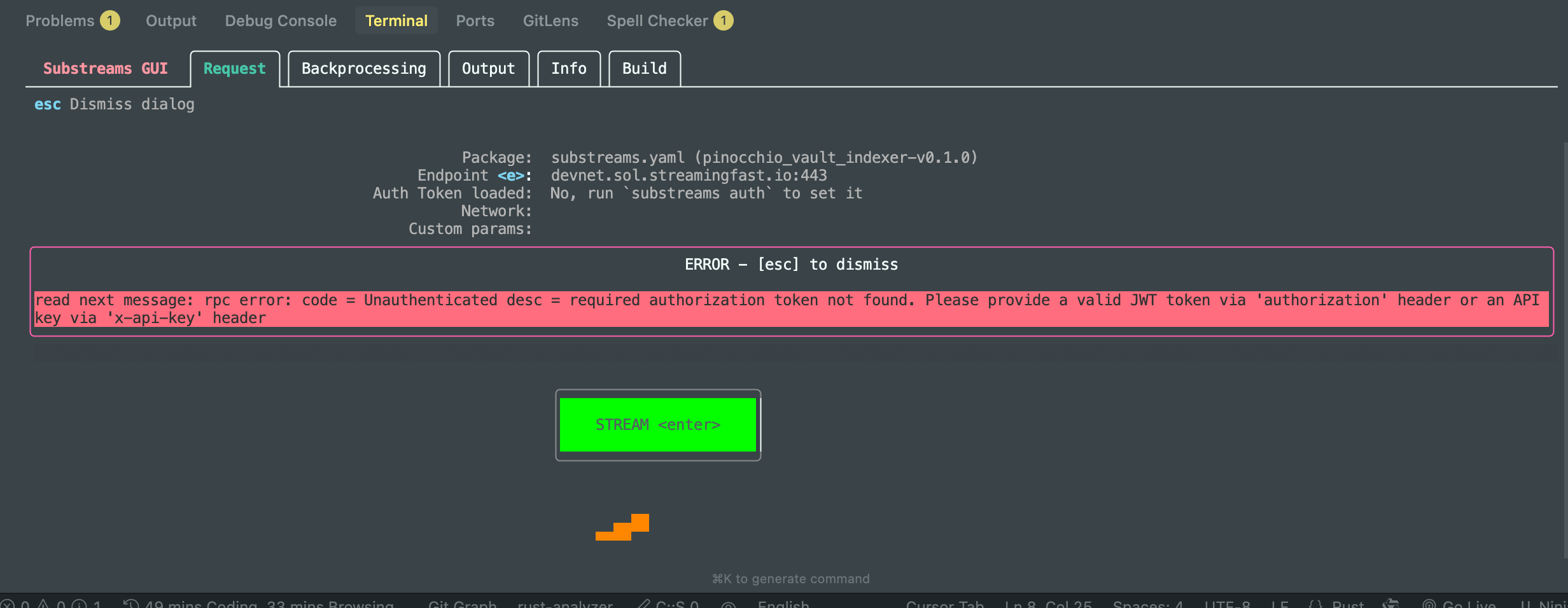
原因:没有认证。
身份鉴权:通过 substreams auth 接入分布式并行处理引擎
substreams auth
如果说 build 是在本地打造引擎,那么 substreams auth 就是点火连接。
Substreams 的核心威力在于其大规模并行处理能力,这种能力通常由 StreamingFast 或 The Graph 等专业的索引服务商在云端集群中提供。执行 substreams auth 命令,会将你的 CLI 客户端与你的服务商账户(如 thegraph.market)进行绑定,并获取一个临时的 JWT 访问令牌。
只有通过了身份验证,当你执行 substreams gui 或同步数据时,你的请求才能被分发到全球数千个节点上并行执行。这正是我们能够‘秒级回溯历史区块’背后的安全与权限基础——它确保了每一份计算资源都精准服务于获得授权的开发者。
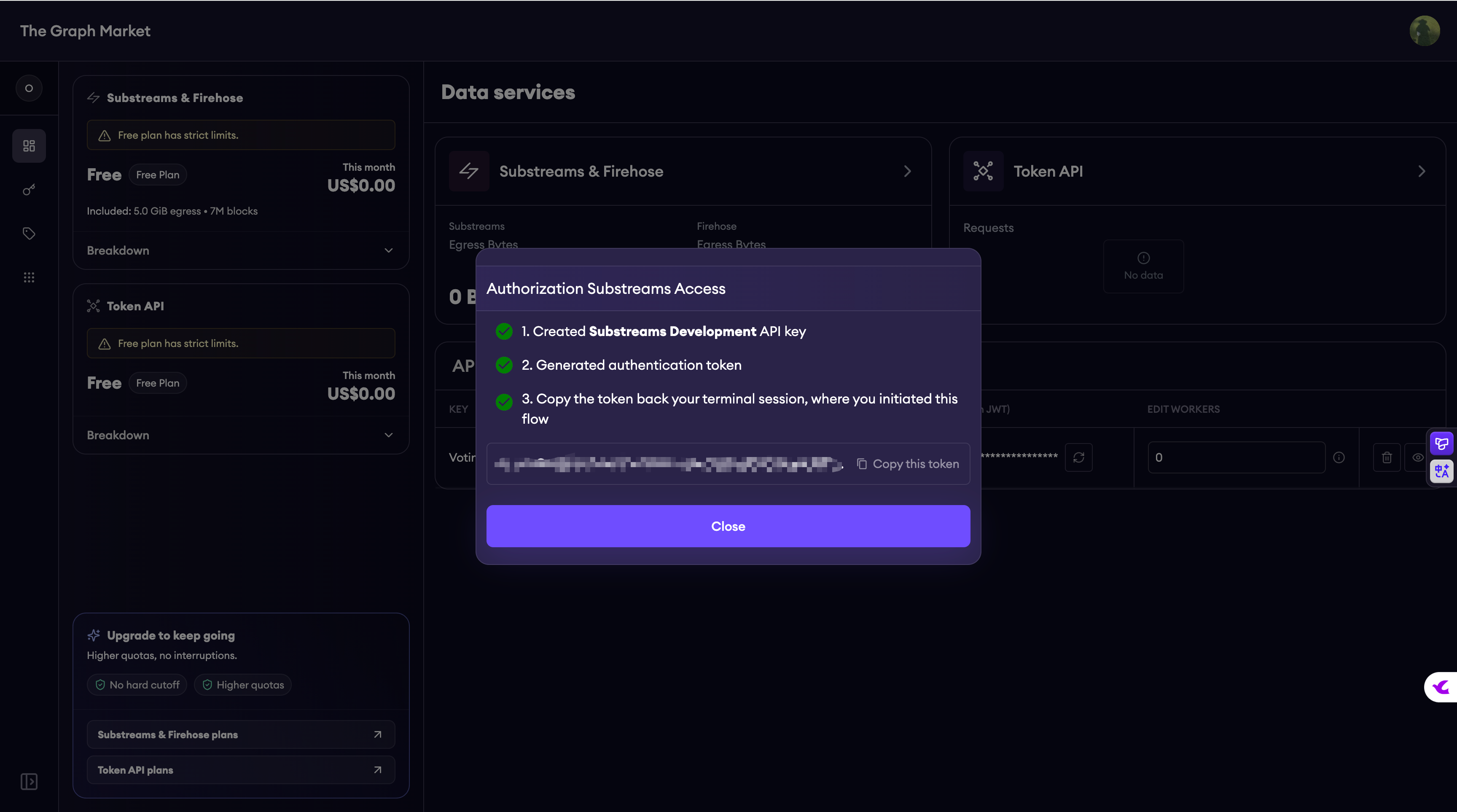
在我们将解析芯片(.spkg)推向战场之前,最后一件事就是通过 substreams auth 换取我们的‘入场券’。一旦身份验证成功,我们面前的就不再是一台孤立的电脑,而是由成百上千台高性能服务器构成的 Substreams 数据网络。
blueshift_vault/pinocchio-vault-substreams/pinocchio_vault_indexer on main [!?] is 📦 0.0.1 via 🦀 1.92.0 took 3m 57.4s
➜ substreams auth
Open this link to authenticate on The Graph Market:
https://thegraph.market/auth/substreams-devenv
Writing `./.substreams.env`. NOTE: Add it to `.gitignore`.
Load credentials in current terminal with the following command:
. ./.substreams.env
🛠️ 激活并运行
在当前的终端窗口中,按照提示执行以下操作:
-
加载认证 Token(注意开头那个点和空格):
. ./.substreams.env -
再次启动 GUI:
substreams gui substreams.yaml map_program_data -e devnet.sol.streamingfast.io:443
现在按下 Enter,你应该就能看到区块高度(Block)开始实时跳动,不再有那个红色的认证错误了!
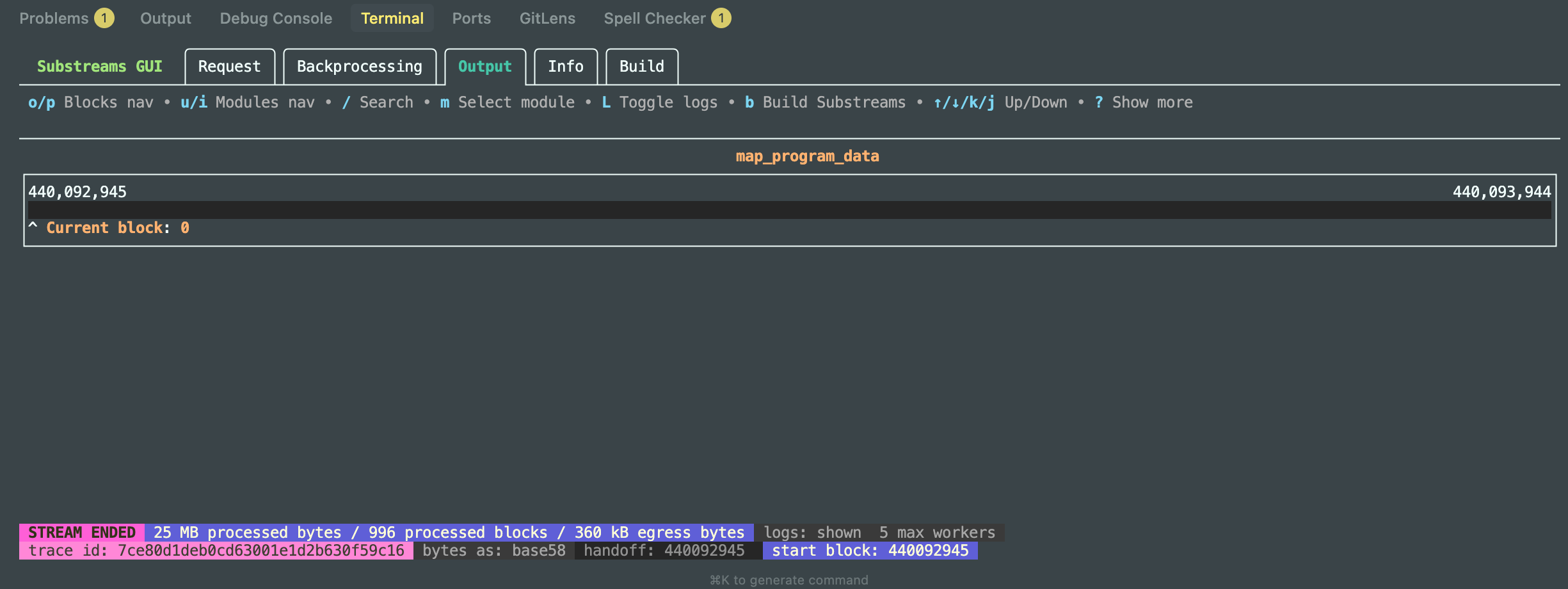
生成交易数据进行 Substreams GUI 验证
blueshift_vault/clients on main [!?] is 📦 1.0.0 via 🍞 v1.2.17 via 🦀 1.92.0
➜ # 在 /Users/qiaopengjun/Code/Solana/blueshift_vault/clients 路径下执行
bun --env-file=../.env run test_vault.ts
🚀 Starting Blueshift Vault Test...
🔑 Payer loaded: 6MZDRo5v8K2NfdohdD76QNpSgk3GH3Aup53BeMaRAEpd
🔍 Deriving Vault PDA...
📍 Vault PDA Address: GbLNULHLykpyzFTBf5mYsAksoxqvD6UB6sofZjj1LQah
📦 Creating Deposit Instruction...
⏳ Sending Deposit...
✅ Deposit OK!
🔗 Transaction: https://explorer.solana.com/tx/2p2psqRaC9fiiLwrmJwiXf3MSDgoE6XHNbQDbJDFczt3K9SqRwZrSq8rbraczUSwXGFtMKZZwMmD4EffnzazCG29?cluster=custom&customUrl=https://devnet.helius-rpc.com/?api-key=5f3eaea5-07fc-461f-b5f3-caaa53f34e8c
⏳ Sending Withdraw...
✅ Withdraw OK!
🔗 Transaction: https://explorer.solana.com/tx/52Mmi4G1PuQF3yv45K5L4EBm5WnjxApqFS2uo5W1TznhPBt9zmoAa1nB9Wf5XugfFKm3WSHoLsJAPMWeQt2VbJfR?cluster=custom&customUrl=https://devnet.helius-rpc.com/?api-key=5f3eaea5-07fc-461f-b5f3-caaa53f34e8c
1. 查找交易高度
打开你日志里的任一 Explorer 链接(比如第一个),在网页上找到 “Block” 这一项,记下那个数字(例如:310,456,789)。
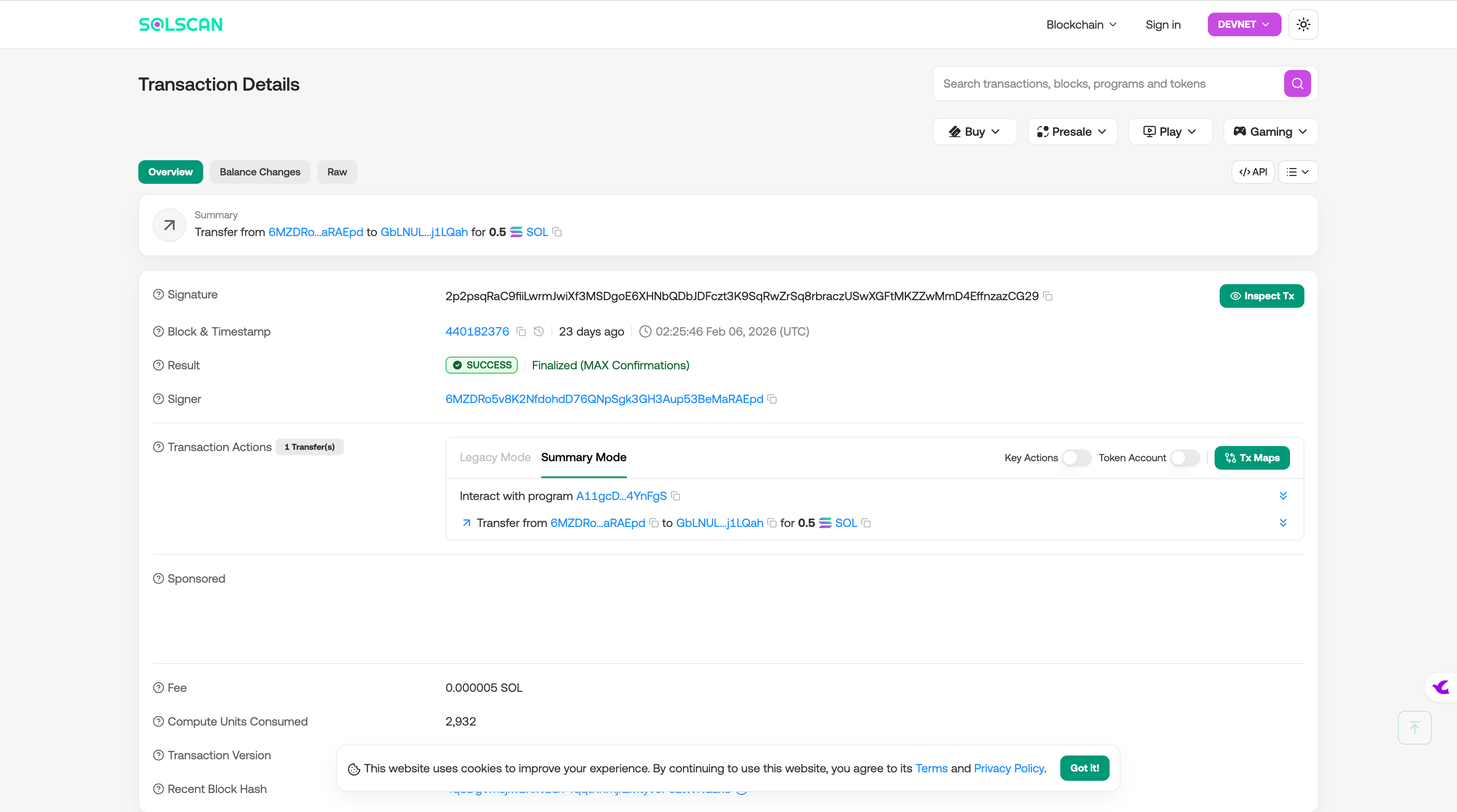
2. 运行 Substreams GUI 验证
回到 pinocchio_vault_indexer 目录,加载环境并运行(将 START_BLOCK 替换为你刚刚查到的 Block 数字减去 10):
. ./.substreams.env
substreams gui substreams.yaml map_program_data \
  -e devnet.sol.streamingfast.io:443 \
  --start-block [你查到的Block数字] \
  --stop-block +1000
实操GUI验证
blueshift_vault/pinocchio-vault-substreams/pinocchio_vault_indexer on main [!?] is 📦 0.0.1 via 🦀 1.92.0 took 14m 24.8s
➜ . ./.substreams.env
substreams gui substreams.yaml map_program_data \
-e devnet.sol.streamingfast.io:443 \
--start-block 440182366 \
--stop-block +1000
Reading SUBSTREAMS_API_TOKEN from .substreams.env
Launching Substreams GUI...
Deposit 交易查询图:
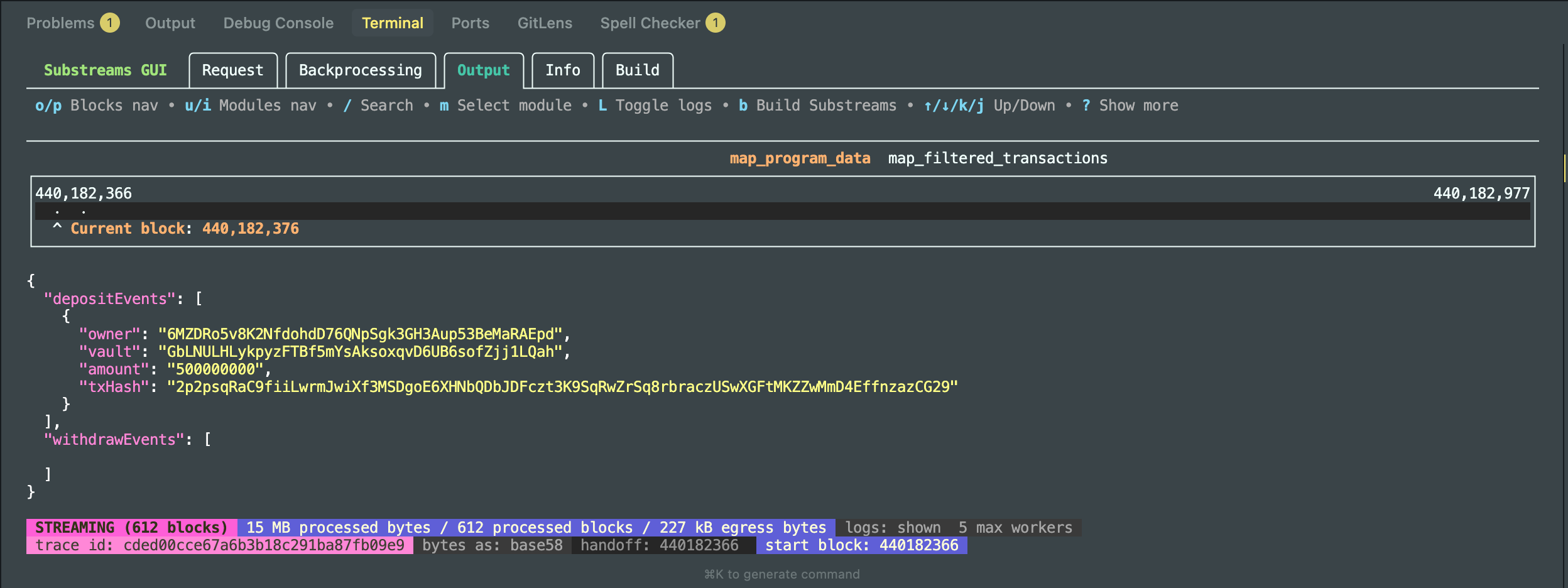
Substreams 已经成功捕捉并解析了你在 Devnet 上刚刚发送的那笔交易:
- Module:
map_program_data正在正常工作。 - Data: 清楚地显示了
depositEvents,包括正确的owner(6MZDRo...)、vaultPDA 地址,以及你存入的500000000(0.5 SOL)。 - Status: 底部显示 STREAMING,说明它正在实时监控区块链。
Withdraw 交易查询图:
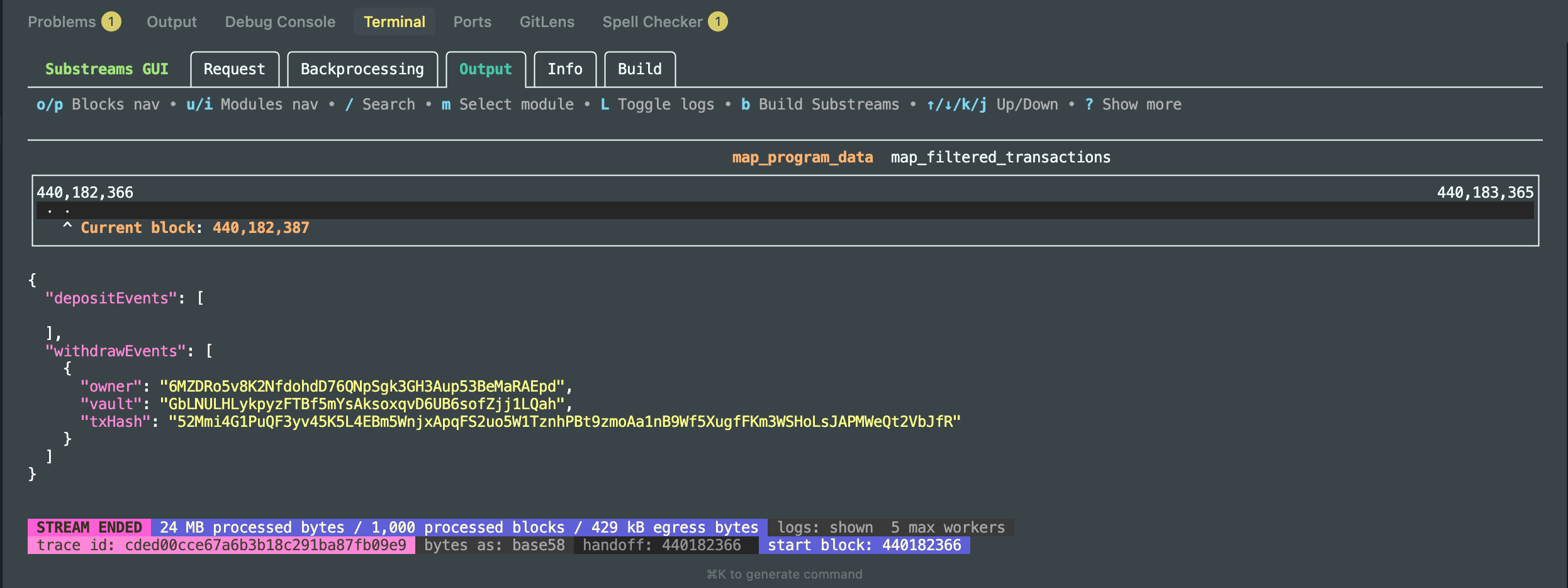
你的整个 Substreams 索引系统已经完全跑通了。
🔍 核心成果分析
- Deposit 捕获成功:在**Deposit 交易查询图:**中,你清晰地抓到了
owner为6MZDRo...的 500,000,000 lamports (0.5 SOL) 存款。 - Withdraw 捕获成功:在 Withdraw 交易查询图: 中,紧随其后的提款交易也被精准识别,包括推导出的 Vault PDA 地址
GbLNULH...。 - 闭环完成:这意味着你的 Rust 合约、Protobuf 定义、Substreams 过滤逻辑以及 TS 客户端测试脚本全部达成了一致。
持久化到 Postgres
第一步:创建建表文件 schema.sql
在你的 pinocchio_vault_indexer 文件夹下新建 schema.sql
-- 1. 存储存款事件
CREATE TABLE IF NOT EXISTS deposits (
    id TEXT PRIMARY KEY,
    owner TEXT,
    vault TEXT,
    amount BIGINT,
    block_number BIGINT
);

-- 2. 存储取款事件
CREATE TABLE IF NOT EXISTS withdraws (
    id TEXT PRIMARY KEY,
    owner TEXT,
    vault TEXT,
    block_number BIGINT
);

-- 3. 进度追踪表
CREATE TABLE IF NOT EXISTS cursors (
    id         TEXT PRIMARY KEY,
    cursor     TEXT,
    block_num  BIGINT,
    block_id   TEXT
);

-- 4. 区块历史记录 (Sink 工具处理分叉必须表)
CREATE TABLE IF NOT EXISTS substreams_history (
    id         TEXT PRIMARY KEY,
    at         TIMESTAMP WITH TIME ZONE DEFAULT CURRENT_TIMESTAMP,
    block_num  BIGINT,
    block_id   TEXT,
    parent_id  TEXT,
    module_hash TEXT
);
第二步:运行同步服务
启动容器 docker compose up -d
1. 启动 Orbstack
在你的 Mac 应用程序里找到 Orbstack 并打开它。看到它运行正常后,再回到终端。
2. 启动数据库
在 pinocchio_vault_indexer 目录下运行:
docker compose up -d
3. 验证数据库是否在线
运行这个命令查看容器状态:
docker compose ps
你应该能看到 postgres 容器显示为 Up 或 Running。
实操启动容器服务
blueshift_vault/pinocchio-vault-substreams/pinocchio_vault_indexer on main [!?] is 📦 0.0.1 via 🦀 1.92.0
➜ orb status
Stopped
blueshift_vault/pinocchio-vault-substreams/pinocchio_vault_indexer on main [!?] is 📦 0.0.1 via 🦀 1.92.0
➜ orb start
blueshift_vault/pinocchio-vault-substreams/pinocchio_vault_indexer on main [!?] is 📦 0.0.1 via 🦀 1.92.0 on 🐳 v28.2.2 (orbstack)
➜ orb status
Running
blueshift_vault/pinocchio-vault-substreams/pinocchio_vault_indexer on main [!?] is 📦 0.0.1 via 🦀 1.92.0 on 🐳 v28.5.2 (orbstack)
➜ docker compose up -d
[+] Running 6/6
✔ pgweb Pulled 24.4s
✔ 172514850d5c Pull complete 2.9s
✔ a985ae29bce3 Pull complete 2.9s
✔ 6d6fe1905aef Pull complete 4.0s
✔ 08f5e74cda33 Pull complete 4.1s
✔ 1cc9050fcc4b Pull complete 4.2s
[+] Running 3/3
✔ Network pinocchio_vault_indexer_default Created 0.1s
✔ Container postgres-substreams Started 0.8s
✔ Container pgweb-substreams Started 0.3s
blueshift_vault/pinocchio-vault-substreams/pinocchio_vault_indexer on main [!?] is 📦 0.0.1 via 🦀 1.92.0 on 🐳 v28.5.2 (orbstack) runs 🐙 PP took 25.7s
➜ docker compose ps
NAME IMAGE COMMAND SERVICE CREATED STATUS PORTS
pgweb-substreams sosedoff/pgweb:0.16.1 "/usr/bin/pgweb --bi…" pgweb 2 minutes ago Up About a minute 0.0.0.0:8081->8081/tcp, [::]:8081->8081/tcp
postgres-substreams postgres:17 "docker-entrypoint.s…" postgres 2 minutes ago Up 2 minutes (healthy) 0.0.0.0:5432->5432/tcp, [::]:5432->5432/tcp
太棒了!你的 Docker 容器已经成功跑起来了,而且 Orbstack 表现非常完美。
🔍 现状分析
- Postgres (端口 5432): 你的数据库已经就绪。
- pgweb (端口 8081): 这是一个非常方便的可视化数据库管理界面。
- 试一下:在浏览器打开
http://localhost:8081。 - 你应该能看到数据库内容。现在它是空的,因为我们还没建表。
- 试一下:在浏览器打开
第三步:建表
blueshift_vault/pinocchio-vault-substreams/pinocchio_vault_indexer on main [!?] is 📦 0.0.1 via 🦀 1.92.0 on 🐳 v28.5.2 (orbstack) runs 🐙 PP
➜ docker exec -i postgres-substreams psql -U dev -d main < schema.sql
CREATE TABLE
CREATE TABLE
CREATE TABLE
建表成功!你现在已经完成了从“捕获数据”到“准备存储”的跨越。CREATE TABLE 的三次输出标志着你的 deposits、withdraws 和 cursors 表已经在本地 Docker 数据库中就位了。
第四步:启动 substreams-sink-sql 实现持久化数据“落袋为安“
如果说之前的 build 和 gui 让我们看到了流动的数据,那么 substreams-sink-sql run 则是将这些流动的数据‘冻结’并存入仓库。
这个命令启动了一个名为 Sink(汇点)的专用工具。它扮演了桥梁的角色:左手通过 StreamingFast 节点获取经过我们 Rust 逻辑解析后的结构化数据,右手通过标准 PostgreSQL 协议连接到本地数据库。
blueshift_vault/pinocchio-vault-substreams/pinocchio_vault_indexer on main [!?] is 📦 0.0.1 via 🦀 1.93.1 on 🐳 v28.5.2 (orbstack) runs 🐙 PP
➜ substreams-sink-sql run \
"psql://dev:insecure@127.0.0.1:5433/main?sslmode=disable" \
./pinocchio-vault-indexer-v0.1.0.spkg \
440092945 --endpoint devnet.sol.streamingfast.io:443
2026-03-02T00:10:33.060+0800 INFO (sink-sql) reading substreams manifest {"manifest_path": "./pinocchio-vault-indexer-v0.1.0.spkg"}
2026-03-02T00:10:33.068+0800 INFO (sink-sql) finding output module {"module_name": "map_program_data"}
2026-03-02T00:10:33.068+0800 INFO (sink-sql) validating output module type {"module_name": "map_program_data", "module_type": "proto:sf.substreams.sink.database.v1.DatabaseChanges"}
2026-03-02T00:10:33.069+0800 INFO (sink-sql) sinker from CLI {"endpoint": "devnet.sol.streamingfast.io:443", "manifest_path": "./pinocchio-vault-indexer-v0.1.0.spkg", "params": [], "network": "", "output_module_name": "@!##_InferOutputModuleFromSpkg_##!@", "expected_module_type": "sf.substreams.sink.database.v1.DatabaseChanges,sf.substreams.database.v1.DatabaseChanges", "start_block": 440092945, "stop_block": 0, "start_block_empty": true, "development_mode": false, "noop_mode": false, "max_retries": 3, "final_blocks_only": false, "skip_package_validation": false, "live_block_time_delta": "0s", "undo_buffer_size": 0, "extra_headers": []}
2026-03-02T00:10:35.871+0800 INFO (sink-sql) sinker configured {"mode": "Production", "module_count": 5, "output_module_name": "map_program_data", "output_module_type": "proto:sf.substreams.sink.database.v1.DatabaseChanges", "output_module_hash": "61e3affc0c64fc112644df87595f3e3bce879937", "client_config": "devnet.sol.streamingfast.io:443 (insecure: false, plaintext: false, JWT present: true)", "buffer": "None", "start_block": 440092945, "stop_block": 0, "max_retries": 3, "final_blocks_only": false, "liveness_checker": true}
2026-03-02T00:10:35.876+0800 INFO (sink-sql) created new DB loader {"batch_block_flush_interval": 1000, "batch_row_flush_interval": 100000, "live_block_flush_interval": 1, "on_module_hash_mismatch": "Error", "handle_reorgs": true, "dialect": "*db.PostgresDialect"}
2026-03-02T00:10:35.970+0800 INFO (sink-sql) starting sql sink {"stats_refresh_each": "15s", "restarting_at": "#440308047 (4q6wfAhw53ENxM5taUE9duqoaF4K2mNwzVZtJ7Lot5Ei)", "loader": "public/public"}
2026-03-02T00:10:35.971+0800 INFO (sink-sql) starting sinker {"stats_refresh_each": "15s", "restarting_at": "#440308047 (4q6wfAhw53ENxM5taUE9duqoaF4K2mNwzVZtJ7Lot5Ei)", "cursor": "0iAHAmZS50qH_xZi5ydr06WwLpcyAl5vVgvtKhVGj4-39jWTrMXhBWIAFlWtle2huGDiHx_tgY67EAV5r74X9reAh8JjkX58Qw51mY3q-7fvcPPzPABqL-M7XIyKJduZWn7fCl2oJOpYiaTvSPeqJCNWZrZ-TGXz3Got4e1dCsNk_g=="}
2026-03-02T00:10:35.972+0800 INFO (sink-sql) sending request {"start_block": "440092945", "stop_block": "0", "cursor": "0iAHAmZS50qH_xZi5ydr06WwLpcyAl5vVgvtKhVGj4-39jWTrMXhBWIAFlWtle2huGDiHx_tgY67EAV5r74X9reAh8JjkX58Qw51mY3q-7fvcPPzPABqL-M7XIyKJduZWn7fCl2oJOpYiaTvSPeqJCNWZrZ-TGXz3Got4e1dCsNk_g=="}
2026-03-02T00:10:37.696+0800 INFO (sink-sql) substreams using protocol version v4
2026-03-02T00:10:37.971+0800 INFO (sink-sql) substreams stream stats {"data_msg_rate": "0.000 msg/s (0 total)", "undo_msg_rate": "0.000 msg/s (0 total)", "avg_block_wait_time_sec": 0, "avg_block_time_delta_sec": 0, "avg_local_block_processing_time_sec": 0, "last_block": "None"}
2026-03-02T00:10:40.407+0800 INFO (sink-sql) session initialized with remote endpoint {"max_parallel_workers": 5, "linear_handoff_block": 445509000, "resolved_start_block": 440308048, "trace_id": "86bea71716898f8222c7c5dbee9dd5ae"}
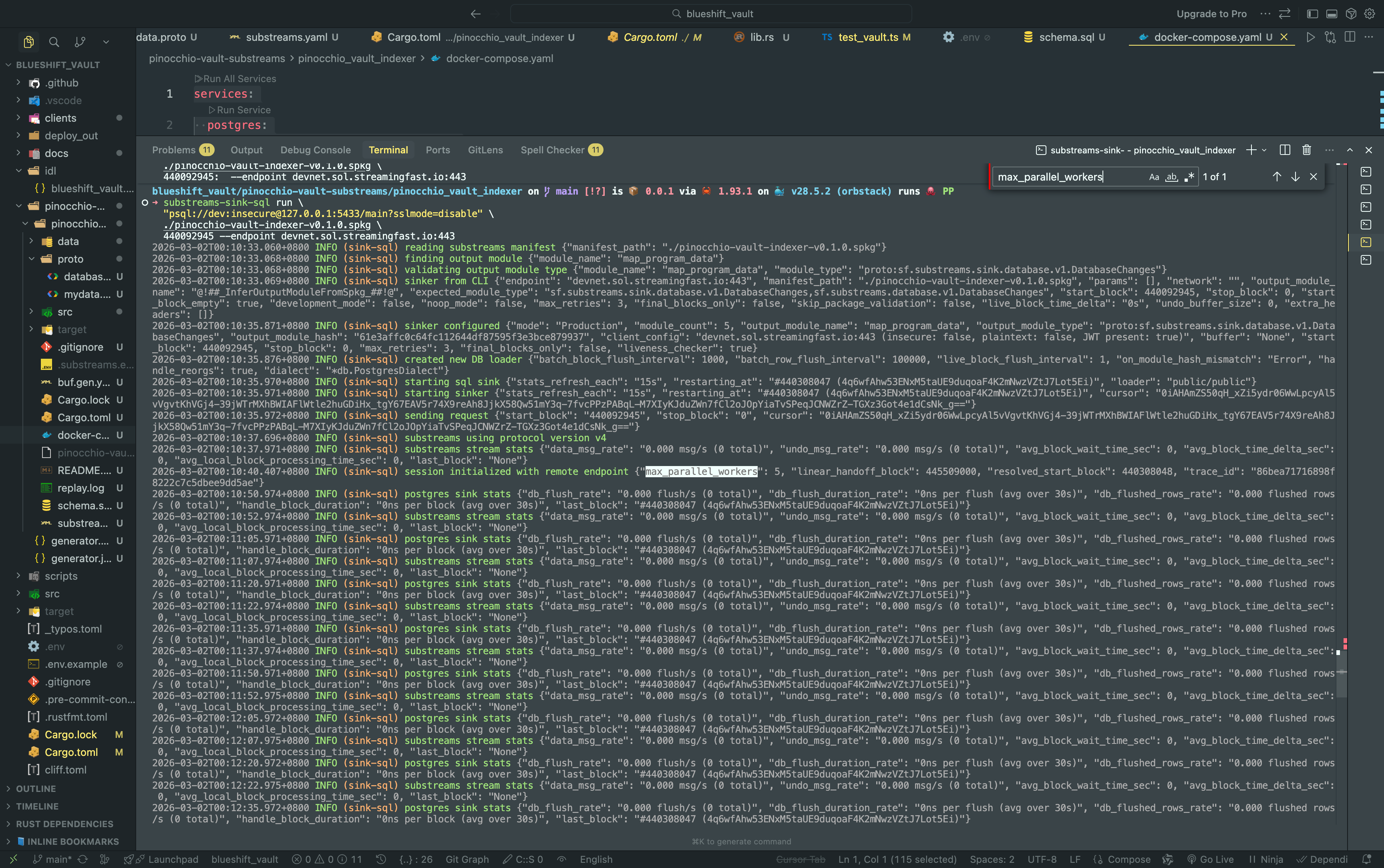
这是整个索引流程的“终极启动命令”,它正式激活了 Substreams-Sink-SQL 汇点工具,将我们在 .spkg 文件中定义的解析芯片嵌入到 Solana Devnet 的实时数据流中。通过连接到本地隔离的 PostgreSQL 数据库(端口 5433),Sink 会自动识别名为 map_program_data 的输出模块,并利用 Substreams 强大的 Cursor(游标)机制 从指定的区块高度(440092945)开始,通过分布式集群并行回溯历史并持续监听实时区块。此时,你的 Rust 解析代码已化身为高性能的工业级插件,正精准地将链上原始字节实时转化为数据库中的结构化记录。
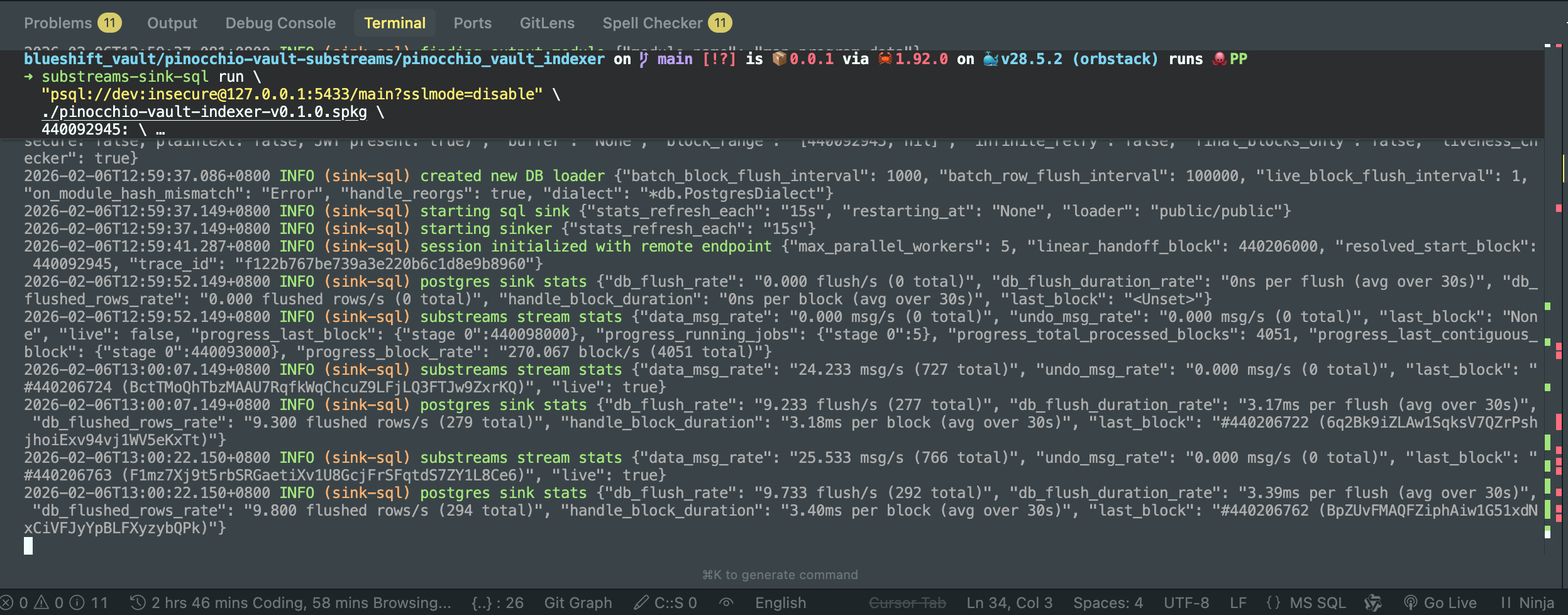
注意:特别强调端口是 5433 而不是默认的 5432。这是为了避免和本地数据库端口冲突修改的。
docker-compose.yaml 文件
services:
  postgres:
    container_name: postgres-substreams
    image: postgres:17
    ports:
      - "5433:5432"
    command: ["postgres", "-cshared_preload_libraries=pg_stat_statements"]
    environment:
      POSTGRES_USER: dev
      POSTGRES_PASSWORD: insecure
      POSTGRES_DB: main
      POSTGRES_INITDB_ARGS: "-E UTF8 --locale=C"
      POSTGRES_HOST_AUTH_METHOD: md5
    volumes:
      - ./data/postgres:/var/lib/postgresql/data
    healthcheck:
      test: ["CMD", "pg_isready"]
      interval: 30s
      timeout: 10s
      retries: 15
  pgweb:
    container_name: pgweb-substreams
    image: sosedoff/pgweb:0.16.1
    restart: on-failure
    ports:
      - "8081:8081"
    command: ["pgweb", "--bind=0.0.0.0", "--listen=8081", "--binary-codec=hex"]
    links:
      - postgres:postgres
    environment:
      - PGWEB_DATABASE_URL=postgres://dev:insecure@postgres:5432/main?sslmode=disable
    depends_on:
      - postgres
💡 关键日志深度解析
finding output module ... map_program_data:系统成功找到了你编写的 Rust 入口函数,并确认了它输出的是DatabaseChanges格式,这是入库的“通行证”。restarting_at: #440308047:这是一个非常关键的细节!虽然你指定的开始区块是440092945,但日志显示它从440308047重启。这证明了 Cursor 机制 正在起作用——它发现你之前已经同步过一段数据,于是智能地从断点处续传,避免了数据重复。max_parallel_workers: 5:这标志着云端有 5 个并行工作节点正在为你全力加速,这正是 Substreams 碾压传统 RPC 轮询方案的核心所在。
至此,整条‘数据高速公路’已经彻底通车。链上有交易,本地有记录。下面,让我们打开数据库客户端,去收割我们辛苦索引回来的‘战利品’。
万事俱备,只欠‘视觉化’。在我们的 docker-compose.yaml 中,除了核心的 Postgres 数据库,我还配置了一个轻量级的数据浏览器 Pgweb。
通过映射后的 8081 端口,我们可以直接在浏览器中打开这个‘数据后窗’。不仅如此,我还特意开启了 --binary-codec=hex 模式,确保链上的原始字节能以最直观的十六进制格式呈现在我们面前。现在,打开浏览器,访问 http://localhost:8081,让我们见证数据入库的瞬间!
在 Pgweb 中见证数据“落袋为安”
打开浏览器在 deposits 表里查看交易
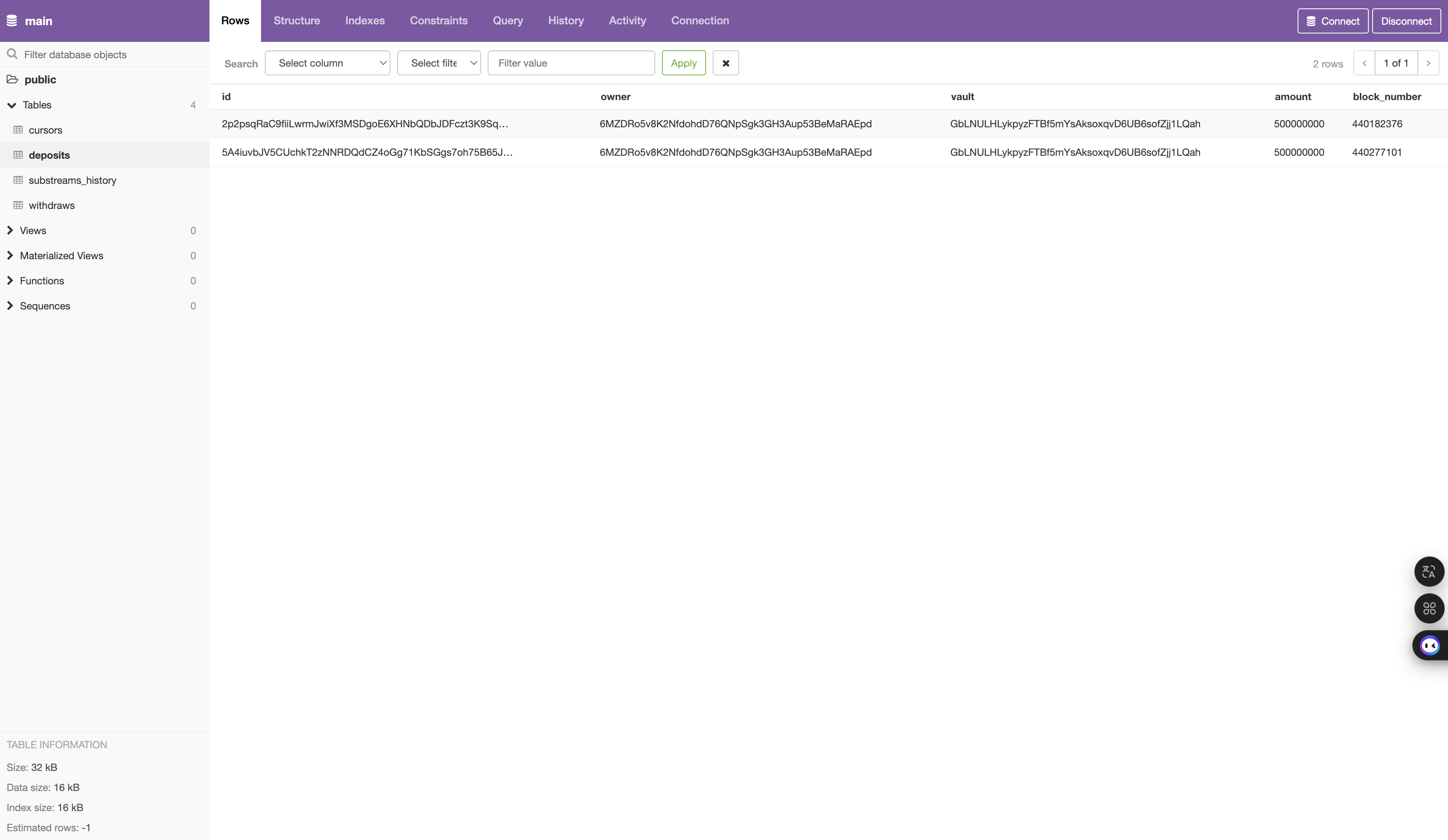
当我打开 http://localhost:8081,看到 deposits 表中静静躺着的这两行数据时,那种掌控感是无与伦比的。
每一列都承载着关键信息:
- id: 这是我们通过
tx_hash + instruction_index生成的唯一标识,确保了数据的幂等性。 - owner: 准确记录了发起存款的用户钱包地址。
- vault: 验证了资金确实流向了我们派生的那个 PDA 金库。
- amount: 链上的原始
u64字节已被精准解析为结构化数字。 - block_number: 每一个动作都被永久地锚定在了 Solana 的历史长河中。
曾经需要复杂 RPC 调用、解析原始 Buffer 才能获取的信息,现在只需一条简单的 SQL 语句即可查出。这,就是 Substreams 赋予 Web3 应用的数据超能力。
通过SQL 查询相关信息
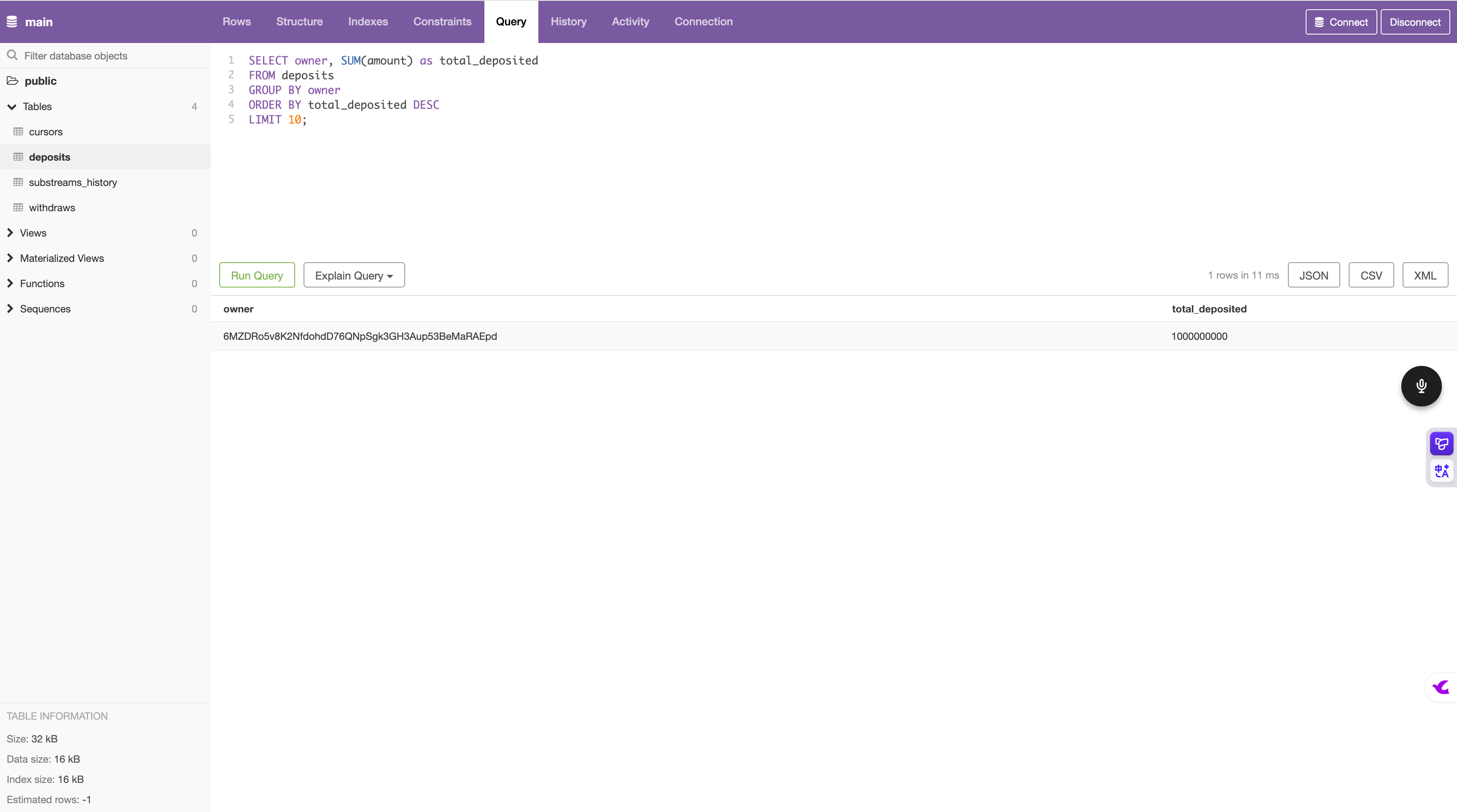
如果说看到数据入库是第一步,那么能够随心所欲地查询数据,才算真正握住了 Web3 应用的方向盘。
在 Pgweb 的 Query 窗口中,我运行了一段简单的 SQL 聚合查询:
瞬间,结果跃然纸上。那个曾经只存在于 Solana 指令数据(Instruction Data)中的十六进制数字,现在已经变成了清晰的 total_deposited: 1000000000。
这意味着,基于这套 Substreams 索引器,我们可以轻松构建出:
- 实时排行榜:谁是金库最大的储蓄者?
- 资产变动趋势:金库的 TVL(总锁仓量)在过去 24 小时是如何波动的?
- 用户行为分析:哪些地址是我们的高频活跃用户?
这一切,都不再需要去忍受 RPC 接口的缓慢与局限,所有的业务逻辑都可以在熟悉的 SQL 领域内高速运行。
🏆 总结:从原始字节到业务洞察的闭环
从第一篇的合约开发,到今天的实时索引,我们亲手构建了一个高性能的 Solana 应用全链路闭环。我们不再仅仅是链上数据的被动观察者,而是进化成了能够将底层字节转化为实际业务价值的建设者。
通过本系列的两篇文章,我们合力完成了一个工业级的挑战:
- 上行链路 (On-chain Interaction):利用 Pinocchio + Codama 极速构建了极致轻量化的合约与自动化 SDK,解决了**“数据如何上链”**的工程效率问题。
- 下行链路 (Data Indexing):利用 Substreams + Postgres 构建了高性能实时索引引擎,解决了**“数据如何回流”**的复杂查询难题。
这一“往”一“返”之间,构成了 Solana 全栈开发的完整闭环。在这个架构下,开发者不再受限于区块链底层的异步与复杂性,而是能够像开发传统互联网应用一样,享受极致的编译速度与丝滑的数据处理体验。
这就是 Pinocchio Vault 的故事,也是每一位 Solana 开发者通往工业级 Web3 应用的必经之路。
📖 推荐阅读:全栈开发系列
如果你错过了本系列的第一篇,建议先阅读合约篇,了解我们是如何构建这个极致轻量化的 Vault 合约的:
- 仅 0.6 秒编译!用 Pinocchio 打造极致轻量化 Solana Vault 合约全记录
💻 源码与实战
本项目全套代码(包含合约、TS/Rust SDK 及 Substreams 索引器)已开源,欢迎 Star 关注:
🚀 下一站预告
数据已经入库,价值即将显现。下一篇我们将探讨如何基于这些结构化数据,构建一个实时看板 (Dashboard),将 Pinocchio Vault 的资金动态通过可视化图表精准呈现。敬请期待!
💡 如果你觉得这篇文章对你有帮助,欢迎“点赞”、“在看”,并在后台留言交流。你的支持是我继续分享 Solana 实战干货的最大动力!
📚 参考资料
- https://github.com/Solana-ZH/Solana-bootcamp-2026-s1
- https://github.com/streamingfast/substreams-starter
- https://mp.weixin.qq.com/s?__biz=MzkzNDMwMTg1Nw==&mid=2247490569&idx=1&sn=c4568f85ee065f701dff9abd8324ba47&chksm=c2be05c7f5c98cd13968aa82aa4e7551fa7c1a0680e3e940746938248999fd90091bf1723c54&token=2110142912&lang=zh_CN#rd
- https://github.com/streamingfast/substreams-solana
- https://solscan.io/tx/2p2psqRaC9fiiLwrmJwiXf3MSDgoE6XHNbQDbJDFczt3K9SqRwZrSq8rbraczUSwXGFtMKZZwMmD4EffnzazCG29?cluster=devnet
- https://solscan.io/tx/52Mmi4G1PuQF3yv45K5L4EBm5WnjxApqFS2uo5W1TznhPBt9zmoAa1nB9Wf5XugfFKm3WSHoLsJAPMWeQt2VbJfR?cluster=devnet
- https://solscan.io/tx/2AFdDLdyBDDYT2uYGBC5YouFBEvbXBUEzwxdE4BMGWy2FWAjoywnCfVJuU6PBYKka1ngVDsqs3jvy5w4k2o26Z6D?cluster=devnet
- https://solscan.io/account/A11gcDm7e8Pit4RiunfhtrK1BKU4oYAa3nx54R4YnFgS?cluster=devnet