Aleo 开发实战:用 TypeScript 打通隐私合约本地验证与上链全流程
Aleo 开发实战:用 TypeScript 打通隐私合约本地验证与上链全流程
在上一篇文章《Aleo 开发实战:从环境搭建到隐私合约上链的全过程》中,我们一起完成了 Aleo 隐私公链的环境搭建、项目初始化,并成功将第一个零知识证明(ZK)智能合约部署到了测试网。还掌握了如何通过优化程序名称来规避高额的“命名费”。
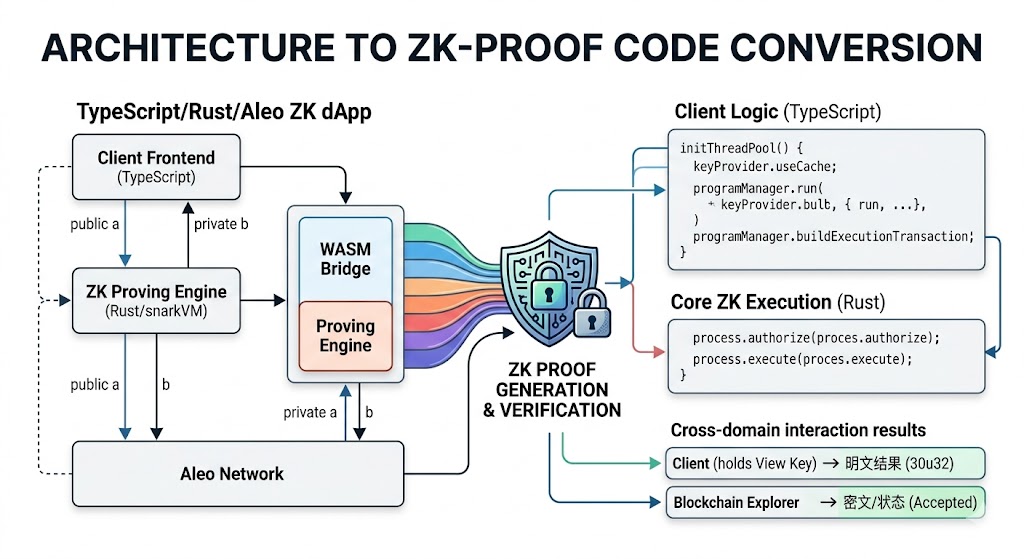
合约部署成功只是第一步,在真实的业务场景中,我们该如何用代码优雅地调用它?今天,我们将视线转向应用层交互。本文将手把手教你从零搭建 TypeScript 开发环境,借助官方最新的 SDK,跑通一个具备工业级容错思维的 Aleo 智能合约交互脚本。带你亲身体验 ZK 世界里独有的“本地明文极速试跑 + 链上密文硬核验算”的绝妙架构!
本文是 Aleo 开发实战进阶篇,带你使用 TypeScript 脚本打通智能合约“本地明文验证 + 链上 ZK 证明执行”全流程。通过代码实操,解析 WASM 多线程加速、交易轮询及“链下计算,链上验算”的底层机制,助你掌握 Aleo 工程化交互逻辑。
实操
初始化 TS 目录并安装依赖
在你的项目根目录下执行以下命令,创建并进入 client-ts 目录:
mkdir client-ts && cd client-ts
bun init -y

# 安装最新的 Aleo/Provable SDK
bun add @provablehq/sdk
项目初始化实操
hello on main [!]
➜ mkdir client-ts && cd client-ts
hello/client-ts on main [!]
➜ bun init -y && bun add @provablehq/sdk
+ .gitignore
+ CLAUDE.md
+ .cursor/rules/use-bun-instead-of-node-vite-npm-pnpm.mdc -> CLAUDE.md
+ index.ts
+ tsconfig.json (for editor autocomplete)
+ README.md
To get started, run:
bun run index.ts
bun install v1.2.17 (282dda62)
+ typescript@5.9.3 (v6.0.3 available)
+ @types/bun@1.3.14
5 packages installed [2.50s]
bun add v1.2.17 (282dda62)
installed @provablehq/sdk@0.10.5
11 packages installed [7.84s]
Blocked 1 postinstall. Run `bun pm untrusted` for details.
查看项目目录结构
hello/client-ts on main [!] via ⬢ v24.15.0 took 40.4s
➜ tree . -L 6 -I ".gitignore|.github|.git|target|node_modules|data"
.
├── CLAUDE.md
├── README.md
├── TROUBLESHOOTING.md
├── index.ts
├── package.json
├── pnpm-lock.yaml
├── pnpm-workspace.yaml
└── tsconfig.json
1 directory, 8 files
index.ts 文件
import {
    Account,
    initThreadPool,
    ProgramManager,
    AleoKeyProvider
} from '@provablehq/sdk';

/**
 * 轮询等待交易被网络确认。
 *
 * SDK 内置的 waitForTransactionConfirmation 每次 404 都会 console.warn,
 * 日志非常脏。这里自己实现一个干净的版本:404 静默重试,只打印进度点。
 */
async function waitForConfirmation(
    programManager: ProgramManager,
    txId: string,
    timeoutMs = 60000,
): Promise<string> {
    const start = Date.now();
    let attempts = 0;
    while (Date.now() - start < timeoutMs) {
        attempts++;
        try {
            const tx = await programManager.networkClient.getConfirmedTransaction(txId);
            if (tx.status === "accepted" || tx.status === "confirmed") return tx.status;
            if (tx.status === "rejected") throw new Error(`Transaction rejected`);
        } catch (err) {
            // 404 是正常的:交易刚提交,还未被打包进区块
            const msg = err instanceof Error ? err.message : String(err);
            if (!msg.includes("404") && !msg.includes("not found")) {
                console.warn(`  Polling error: ${msg}`);
            }
        }
        if (attempts === 1) process.stdout.write("  Waiting.");
        process.stdout.write(".");
        await new Promise((r) => setTimeout(r, 2000));
    }
    console.log();
    throw new Error(`Transaction not confirmed within ${timeoutMs}ms`);
}

async function main() {
    // ── 初始化 ──────────────────────────────────────────────
    // initThreadPool 启动 12 个 WASM worker 线程,用于并行 ZK 计算
    console.log("Initializing WASM thread pool...");
    await initThreadPool();
    console.log("Thread pool ready");

    // 从 .env 文件加载私钥(Node.js v21+ 原生支持 --env-file)
    const privateKey = process.env.PRIVATE_KEY;
    if (!privateKey) {
        console.error("PRIVATE_KEY not found.");
        process.exit(1);
    }

    // Account 对象持有私钥、View Key、Compute Key、Address
    const account = new Account({ privateKey });
    console.log(`Account: ${account.address()}`);

    // KeyProvider 管理 proving/verifying keys 的缓存
    const keyProvider = new AleoKeyProvider();
    keyProvider.useCache(true);

    // ProgramManager 是执行 Aleo 程序的核心入口
    const programManager = new ProgramManager("https://api.provable.com/v2", keyProvider);
    programManager.setAccount(account);

    // ── 参数 ────────────────────────────────────────────────
    const programName = "hello_paxon_2026.aleo";
    const functionName = "main";
    const inputs = ["10u32", "20u32"];
    const expectedOutput = "30u32";
    const cacheKey = `${programName}:${functionName}`;

    // ── 获取链上已部署的合约源码 ──────────────────────────────
    // buildExecutionTransaction 内部也会从网络获取合约源码,
    // 但 run() 需要显式传入,所以提前获取一次。
    const program = await programManager.networkClient.getProgram(programName);

    /*
     * ── [Step 0] 本地试运行(不生成 ZK proof)────────────────
     *
     * 为什么要这一步?
     *
     * Aleo 的隐私模型决定了:链上所有私有数据都是密文。
     * 你的合约函数签名是:
     *
     *   fn main(public a: u32, b: u32) -> u32
     *
     * 编译为 Aleo Instructions 后:
     *   input r0 as u32.public;   // a=10 → 全网可见
     *   input r1 as u32.private;  // b=20 → 链上存为 ciphertext
     *   output r2 as u32.private; // 结果 → 链上存为 ciphertext
     *
     * 在浏览器 Explorer 里你只能看到 ciphertext1q... 密文。
     * 只有持有 View Key 的本地代码能解密看到明文 "30u32"。
     *
     * run(proveExecution=false) 在本地用 WASM 执行合约,不生成 proof,
     * 速度很快(~1s),直接返回明文输出。用于在执行链上交易前验证逻辑。
     *
     * 为什么本地的结果可以信任?
     * Aleo 程序是确定性的——同样的代码 + 同样的输入 = 同样的输出。
     * 链上执行 buildExecutionTransaction 时,ZK proof 数学上保证了
     * 计算过程正确。链上 Status: accepted = 全网节点已验证 proof 通过。
     */
    console.log("\n[0] Local dry-run...");
    const localResult = await programManager.run(
        program,
        functionName,
        inputs,
        false, // proveExecution=false → 不需要密钥,快速执行
    );
    const localOutputs = localResult.getOutputs(); // 明文输出,如 ["30u32"]
    console.log(`  Expected: ${expectedOutput}`);
    console.log(`  Got:      ${localOutputs[0]}`);
    if (localOutputs[0] !== expectedOutput) {
        console.error("  Output mismatch!");
        process.exit(1);
    }
    console.log("  OK");

    /*
     * ── [Step 1] 构建链上执行交易 ────────────────────────────
     *
     * buildExecutionTransaction 内部做了这些事:
     *   1. 从 API 获取合约源码
     *   2. 从 parameters.provable.com 获取 credits.aleo fee 密钥
     *   3. 查找/合成本合约的函数密钥(首次 ~20-40s,CPU 密集型)
     *   4. 生成 Authorization(签名授权)
     *   5. 生成 ZK proof(CPU 密集型)
     *   6. 构建完整交易
     *
     * 返回的 tx 是一个 WASM Transaction 对象,可以直接传给 submitTransaction。
     */
    console.log("\n[1] Building execution transaction (ZK proving)...");
    const startTime = Date.now();
    const tx = await programManager.buildExecutionTransaction({
        programName,
        functionName,
        priorityFee: 0.001,    // 优先费(单位:Aleo credits)
        privateFee: false,     // false=用 public balance 付手续费
        inputs,
        keySearchParams: { cacheKey },
    });
    console.log(`  Done in ${((Date.now() - startTime) / 1000).toFixed(1)}s`);

    /*
     * ── [Step 2] 提交交易到 Aleo 测试网 ──────────────────────
     *
     * submitTransaction 接受 Transaction 对象或字符串。
     * 官方文档直接传对象,保持一致。
     */
    console.log("[2] Submitting...");
    const txId = await programManager.networkClient.submitTransaction(tx);

    /*
     * ── [Step 3] 等待确认 + 获取链上详情 ──────────────────────
     *
     * 交易提交后需要 1-3 个区块(约 3-9 秒)才能被确认。
     * waitForConfirmation 轮询 /transaction/confirmed/{txId} 直到状态变为 accepted。
     * getTransaction 获取已确认交易的详情(type、execution 等)。
     */
    console.log("[3] Waiting for confirmation...");
    const status = await waitForConfirmation(programManager, txId);
    const transaction = await programManager.networkClient.getTransaction(txId);

    // ── 结果汇总 ─────────────────────────────────────────────
    console.log(`\nTransaction: ${txId}`);
    console.log(`Status:     ${status}`);
    console.log(`Type:       ${transaction.type}`);
    console.log(`Result:     ${localOutputs[0]}`);
    console.log(`Explorer:   https://testnet.explorer.provable.com/transaction/${txId}`);
}

main();
这段代码是一个成熟的 Aleo 智能合约交互流水线。它首先通过环境变量安全加载私钥并激活 WASM 多线程环境,接着巧妙地采用了“两步走”策略:
第一步先在本地进行极速的“明文试运行(dry-run)”,以确保代码逻辑无误且结果符合预期;
第二步再正式调动本地算力生成零知识证明(ZK Proof),将加密后的交易提交到测试网,并使用自定义的静默轮询机制优雅地等待区块链的最终确认。
运行
hello/client-ts on main [!?] via ⬢ v24.15.0 took 2.3s
➜ pnpm start
$ node --env-file=../.env --import tsx index.ts
Initializing WASM thread pool...
Spawning 12 threads
Thread pool ready
Account: aleo1cu0xk4tt99pgxglpqltzk3tmpgh7qftjwukxcmewzpy0fkqghvgsxu0g03
[0] Local dry-run...
Function keys not found. Key finder response: 'Error: Invalid parameters provided, must provide either a cacheKey and/or a proverUrl and a verifierUrl'. The function keys will be synthesized
Running program offline
Proving key: undefined
Verifying key: undefined
Check program imports are valid and add them to the process
Loading program
Loading function
Adding program to the process
Creating authorization
parsing inputs
Executing program
Expected: 30u32
Got: 30u32
OK
[1] Building execution transaction (ZK proving)...
Fetching proving keys from url https://parameters.provable.com/testnet/fee_public.prover.f72b6ff
Checking if key exists in cache. KeyId: hello_paxon_2026.aleo:main
Function keys not found. Key finder response: 'Error: Key not found in cache.'. The function keys will be synthesized
Check program imports are valid and add them to the process
Executing function: hello_paxon_2026.aleo/main on-chain
Loading program
Loading function
Adding program to the process
Creating authorization
parsing inputs
Executing program
Preparing inclusion proofs for execution
Proving execution
Calculating the minimum execution fee
Executing fee
Inserting externally provided fee proving and verifying keys
Authorizing Fee
Executing Fee
Preparing inclusion proofs for fee execution
Proving fee execution
Verifying fee execution
Creating execution transaction
Done in 24.3s
[2] Submitting...
[3] Waiting for confirmation...
Waiting...
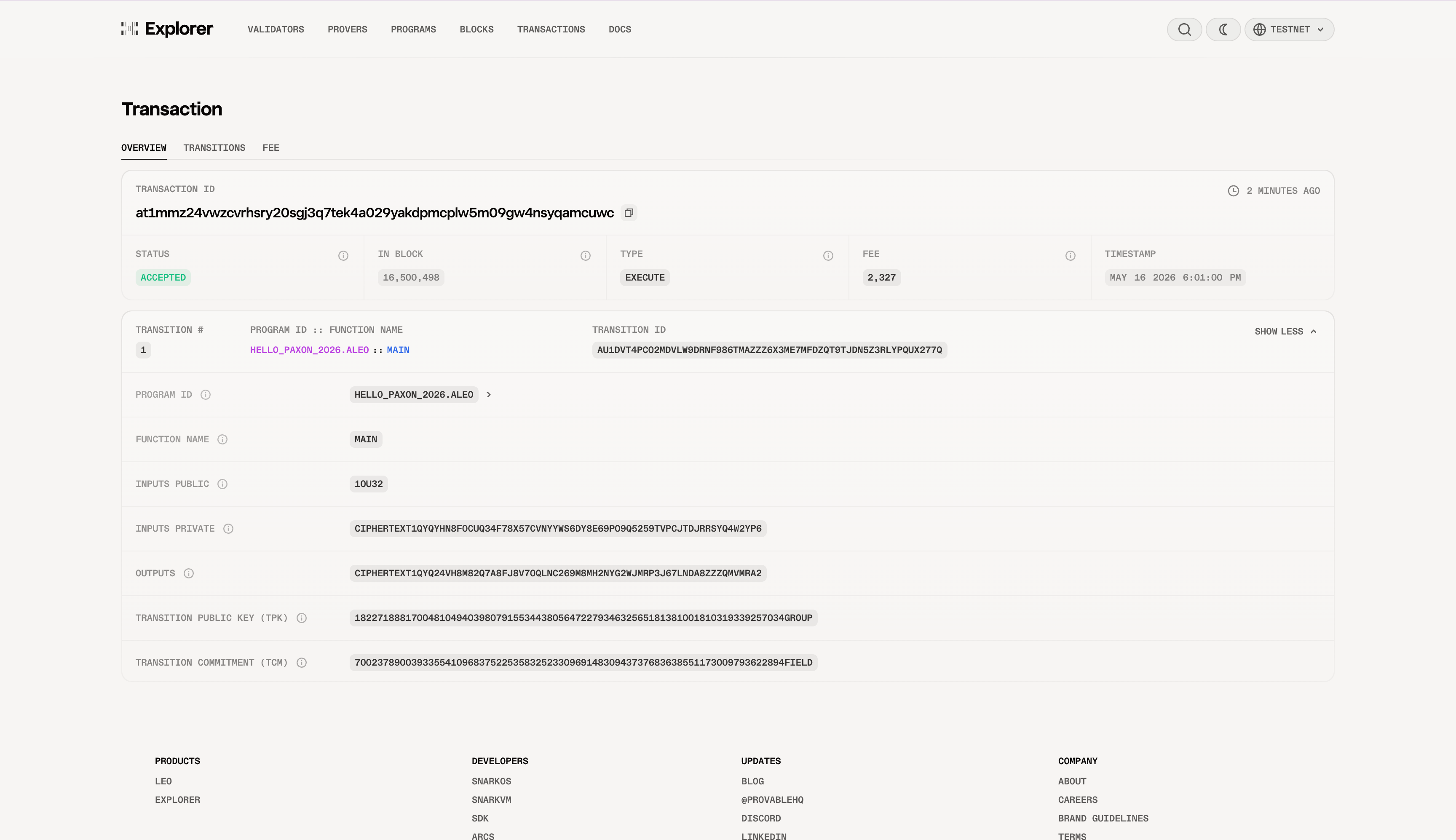
Transaction: at1mmz24vwzcvrhsry20sgj3q7tek4a029yakdpmcplw5m09gw4nsyqamcuwc
Status: accepted
Type: execute
Result: 30u32
Explorer: https://testnet.explorer.provable.com/transaction/at1mmz24vwzcvrhsry20sgj3q7tek4a029yakdpmcplw5m09gw4nsyqamcuwc
这段运行日志清晰地展示了一次完美的 Aleo 零知识证明智能合约完整调用流程:脚本首先成功唤醒 12 个 WASM 底层线程并加载了你的账户,接着在本地试运行(dry-run)阶段瞬间跑通了明文计算,验证了 10 + 20 = 30 的预期逻辑(期间系统由于没有找到缓存,自动为你临时合成了函数密钥);随后进入最吃性能的链上执行构建阶段(耗时 24.3 秒),你的电脑不仅拉取了官方的 fee_public 扣费密钥,还在本地独立完成了核心业务逻辑与支付手续费的 ZK 证明生成与打包;最后,这串不可篡改的加密证明被推送到测试网,并在你手写的轮询监控下,被全网矿工成功验证并接纳(状态变更为 accepted),宣告了这次“链下计算、链上结算”的完美闭环。
💡 开发痛点与问题排查记录
问题 1:程序一直卡住
现象
bun run start 执行后,日志只输出到 Spawning 12 threads,之后进程一直 hang。
诊断
# Bun — hang
bun -e "import { initThreadPool } from '@provablehq/sdk'; await initThreadPool(); console.log('OK')"

# Node.js — 正常
node --import tsx -e "import { initThreadPool } from '@provablehq/sdk'; await initThreadPool(); console.log('OK')"
| 运行时 | initThreadPool() | 结果 |
|---|---|---|
| Bun 1.2.17 | hang | WASM Worker 无法初始化 |
| Node.js v24 | 正常 | 12 线程启动 |
根因
Aleo SDK 的 @provablehq/wasm 使用 Web Workers 做并行 ZK 计算。Bun 的 Worker 实现与 WASM 线程模型不兼容,Worker 被创建后无法正确回传就绪信号,导致 initThreadPool() Promise 永不 resolve。
解决
移除 Bun,改用 Node.js v24 + tsx。
问题 2:VSCode 代码爆红
现象
index.ts 中 console、process 报红,tsconfig.json 有配置错误。
根因
tsconfig.json中module: "ESNext"与moduleResolution: "Node16"不兼容- 未安装
@types/node,Node.js 内置 API(process、console)类型缺失 verbatimModuleSyntax: true与 SDK 导出方式不兼容
解决
- 修正
tsconfig.json:"module": "Node16"(匹配moduleResolution)"types": ["node"](引入 Node.js API 类型)- 移除
verbatimModuleSyntax和jsx(不需要)
- 安装依赖:
pnpm add -D typescript @types/node - 运行
pnpm exec tsc --noEmit验证零错误
问题 3:waitForTransactionConfirmation 输出大量 404
现象
交易提交成功后,控制台刷出一堆 404 错误:
Response text from server: {"statusCode":404...
Non-OK response (retrying): 404 ...
根因
SDK 的 waitForTransactionConfirmation 内部用 console.warn 输出每次轮询失败的错误响应。交易刚提交时未出块,/transaction/confirmed/{id} 返回 404,SDK 2 秒轮询一次,每次都打印 — 这是正常行为,但日志很脏。
解决
改为自定义 waitForConfirmation 函数:
- 调用
getConfirmedTransaction()(返回ConfirmedTransactionJSON,有status字段) - 404 时静默重试,只打印简洁的
Waiting....进度点 - 非 404 错误才输出 console.warn
输出效果:
[3/3] Waiting for confirmation...
  Waiting...
Transaction: at1...
Status:     accepted
问题 4:密钥每次运行都重新合成
现象
进程重启后,每次运行都是 ~30-50s 的密钥合成时间。
根因
AleoKeyProvider 的内存缓存在进程退出后丢失。WASM 内部合成的密钥不会传回 JS 层,无法持久化到磁盘。
状态
暂时接受。首次运行 ~30-50s。synthesizeKeys 可以单独获取密钥并缓存到磁盘,但需要确保程序源码与链上完全一致(含 constructor),否则密钥不匹配导致 proving 失败。
问题 5:浏览器看不到明文执行结果
现象
在 Provable Explorer 中,Inputs (Private) 和 Outputs 都显示为 ciphertext1q... 密文,看不到实际数字。
根因
这是 Aleo ZK 隐私保护的设计目标,不是 bug。fn main(public a: u32, b: u32) -> u32 中:
a声明为public→ 链上可见10u32b默认private→ 链上加密为 ciphertext- 返回值
output r2 as u32.private→ 链上加密为 ciphertext
浏览器是公共面板,没有你的 View Key,无法解密。
解决
在 TypeScript 代码中使用 programManager.run() 本地执行获取明文:
const localResult = await programManager.run(
    program,     // 从 API 获取的合约源码
    "main",
    ["10u32", "20u32"],
    false,       // 不需要生成 proof,快速执行
);
const outputs = localResult.getOutputs(); // ["30u32"]
完整流程:本地试运行(验证输出) → 链上执行(提交 ZK proof) → 确认。
安全模型
- 链上:全网节点验证 ZK proof 数学正确性,但看不到私有数据
- 本地:持有 View Key 的开发者可以解密看到明文结果
Status: accepted= 网络已验证 proof 通过,结果正确
为什么要本地试运行?
Aleo 链上所有私有数据都是密文(浏览器里看到的都是 ciphertext1q...)。想看到明文结果(如 30u32),只能在本地用 programManager.run() 执行并解密。
run(program, fn, inputs, false)— 不生成 proof,快速得到明文输出- 将本地输出与预期值比对,确保合约逻辑正确
- 链上
Status: accepted即表示 ZK 证明验证通过,结果与本地一致
verifyExecution 不适用
verifyExecution 只用于 run(proveExecution=true) 本地离线执行的 proof 验证,不能用于链上交易。链上 proof 由 Aleo 验证节点校验。
Aleo 小知识总结
- 命名即实体: Aleo 没有乱码一样的合约地址。你花钱抢注的
hello_paxon_2026.aleo就是它在全网唯一的身份证(Program ID)。 - 本地计算,链上验算: 你的代码逻辑是在你的电脑上跑完的,发到链上的只是一道“数学题的答案(证明)”。所以别人(包括浏览器)看不到你执行的过程。
- 交易打包机制: 浏览器上的一笔 Transaction,是一个“大包裹”。里面装了你加密的“私有执行记录”,以及公开扣除的“过路费(fee_public)”。由于浏览器只能清晰解析公开数据,所以你会觉得满屏都是
credits.aleo。
总结
通过这套结构清晰的 TypeScript 脚本,我们不仅成功向 Aleo 网络发送了一笔真实的隐私交易,更在代码层面彻底剥开了零知识证明底层“链下密集计算、链上极速验证”的神秘面纱。
在传统的 EVM 公链中,我们习惯了将参数丢给全网节点去重复计算;但在 Aleo 的世界里,代码在你的本地疯狂榨取 WASM 多线程算力生成无法伪造的数学证明,而链上矿工只负责瞬间盖章放行。这种“计算与验证分离”的范式,正是打破 Web3 性能瓶颈并实现彻底隐私的基石。
希望这篇实战演练能帮你彻底扫清 Aleo 客户端交互的障碍。掌握了这套流水线,你只需稍作封装,就能轻松将它接入 React 或 Vue,打造出属于你自己的原生 ZK DApp。Aleo 的未来,其实可以用八个字来概括:**“道阻且长,行则将至。”**隐私 Web3 的大门已经打开,动手去创造吧!
参考
- https://developer.aleo.org/sdk/guides/execute_programs
- https://developer.aleo.org/sdk/overview/
- https://testnet.explorer.provable.com/transaction/at1mmz24vwzcvrhsry20sgj3q7tek4a029yakdpmcplw5m09gw4nsyqamcuwc
- https://testnet.explorer.provable.com/program/hello_paxon_2026.aleo
- https://github.com/qiaopengjun5162/snarkVM
- https://github.com/qiaopengjun5162/aleo-hello
- Aleo SDK 官方文档 - Executing Programs
- ProvableHQ SDK GitHub
- Aleo 101 Bootcamp
- Provable Explorer (Testnet)